
Log in 2–3 times a week, 5–15 minutes per session, keep your IP in the same region year-round. That’s the entire survival logic for a Google account — everything else is execution detail.
More people have been buying and bulk-registering Google accounts lately, and more people are getting account-disabling emails as a result. Over on the LINUX DO forum, someone posts every few days asking the same thing: two weeks after registration, without doing anything unusual, they receive an email saying “Your account has been disabled.” Retailers’ standard reply is usually “just warm up the account for a while,” but how exactly to do that is scattered piecemeal across various reply threads.
I happened to get my hands on an account-warming tutorial circulating in the account-trading community — well-structured, covering everything from login frequency to proxy configuration. The material itself is rough, but the skeleton is sound. I broke down every recommendation, cross-checked each one against Google’s official account policies, and reorganized everything into a checklist you can follow directly. The original’s emoji numbering wasn’t preserved; all suggestions have been rewritten in a conclusion-plus-rationale format.
Here’s the conclusion up front: only four variables determine an account’s fate — login rhythm, behavior patterns, IP stability, and recovery channels. Below, each variable is explained with the range it should fall in.
Login Rhythm: Not Much Needed, but Don’t Go Dark
The threshold for the risk-control system to flag an account as “active” isn’t high. Logging in 2–3 times a week is enough; the bare minimum is once a month. Below that line, the account starts getting flagged as dormant by the system.
More important than frequency is session duration. After logging in, stay for 5–15 minutes, do some normal browsing, then log out. Sessions that log in and out within seconds overlap heavily with the behavioral profile of automation scripts in risk-control logs — this is the single biggest reason newly batch-created accounts die first.
Spread out your login times. If every login happens at exactly 9:00 AM, that regularity is itself an anomaly signal. Randomize your login times, leave some records on both weekdays and weekends, and make your login pattern look like a human’s routine rather than a cron job.
Behavior Patterns: Look Like a Normal User
To keep an account “alive,” logging in isn’t enough — there need to be usage traces. Pick 2–3 actions per week from the options below, each of which is among the most ordinary features in the Google ecosystem.
Gmail: Open your inbox, mark messages as read or unread, delete some junk mail. This is the lowest-cost active behavior.
Google Search: Do a few real searches and click through to search results. Search plus click is the easiest behavioral signal for Google to capture, far more effective than simply logging in.
YouTube: Watch one or two videos in full, for at least 30 seconds. Closing a video halfway through doesn’t help your behavioral profile.
Drive and Maps: Open a file in Drive, create or edit a document; search for a location in Maps or look up a route. These can be lower frequency, but they should show up every month.
Each month, schedule 1–2 low-frequency actions: update your avatar or nickname, run a Security Checkup, verify your recovery email and phone number, or tweak your privacy or ad preferences. These actions shift the account’s system profile from “an email address” to “an account someone maintains,” and maintaining recovery channels directly determines whether you can get the account back if something goes wrong.
Red Lines Not to Cross
One category of behavior carries more weight in the risk-control system than all warming actions combined: signs of batch operations. Each of the following is a high-risk signal — if you encounter any of them, stop immediately.
- Frequent login/logout in a short period. Normal users don’t use email this way.
- Sending large volumes of email, especially with identical or near-identical content. This is the standard profile of a spam bot.
- Batch-creating files, mass-following, or bulk-adding contacts.
- Running automation scripts or bots. Google’s detection covers mouse trajectory and page dwell time — script fingerprints are very hard to hide.
- Frequently switching devices for login.
- Logging many different accounts on the same device. This one is the most lethal for anyone managing multiple accounts — every new login binds two accounts together at the device-fingerprint level.
IP Environment: The Life-or-Death Line in Account Warming
The risk-control model’s sensitivity to login IPs exceeds most people’s expectations. Four requirements, ranked by importance from most to least.
Fixed region. The account’s login IP should consistently land in the same country, same region. Jumping from Japan today to the US tomorrow to Germany the day after — this kind of IP hopping is one of the most common triggers for an account being flagged for suspicious activity. A mismatch between the registration location and the usual login region is likewise recorded as an anomaly.
Avoid dynamic IPs. Dynamic residential IPs and datacenter IP pools share the same problem: addresses drift across logins. Datacenter IP weights in risk-control models have been trending down long-term. An account going out through datacenter A today and datacenter B tomorrow amounts to two anomaly flags.
Proxy quality. Use a stable proxy service with dedicated IPs; avoid cheap shared-exit proxies where hundreds of Google accounts hang behind a single IP. Such an IP is already on a blacklist, and your account is just collateral damage.
Connection posture. Run your tunneling tool in global mode, combined with enhanced mode or TUN mode, ensuring browser traffic and background API requests go through the same exit. If the HTML page goes through proxy A while Google’s background telemetry requests go through proxy B, the risk-control system sees two simultaneous locations online. As for which region to pick — the principle is simple: whatever region the account was registered in, keep it that way forever.
If you’re a more hardcore user wanting to turn account warming into an automated pipeline, I previously wrote a piece on Google Account Registration and VPS Account Warming: A Practical Guide — using a $12/month AWS VPS with Docker remote browsers to solve IP and device-fingerprint issues, which can be used alongside this daily checklist.
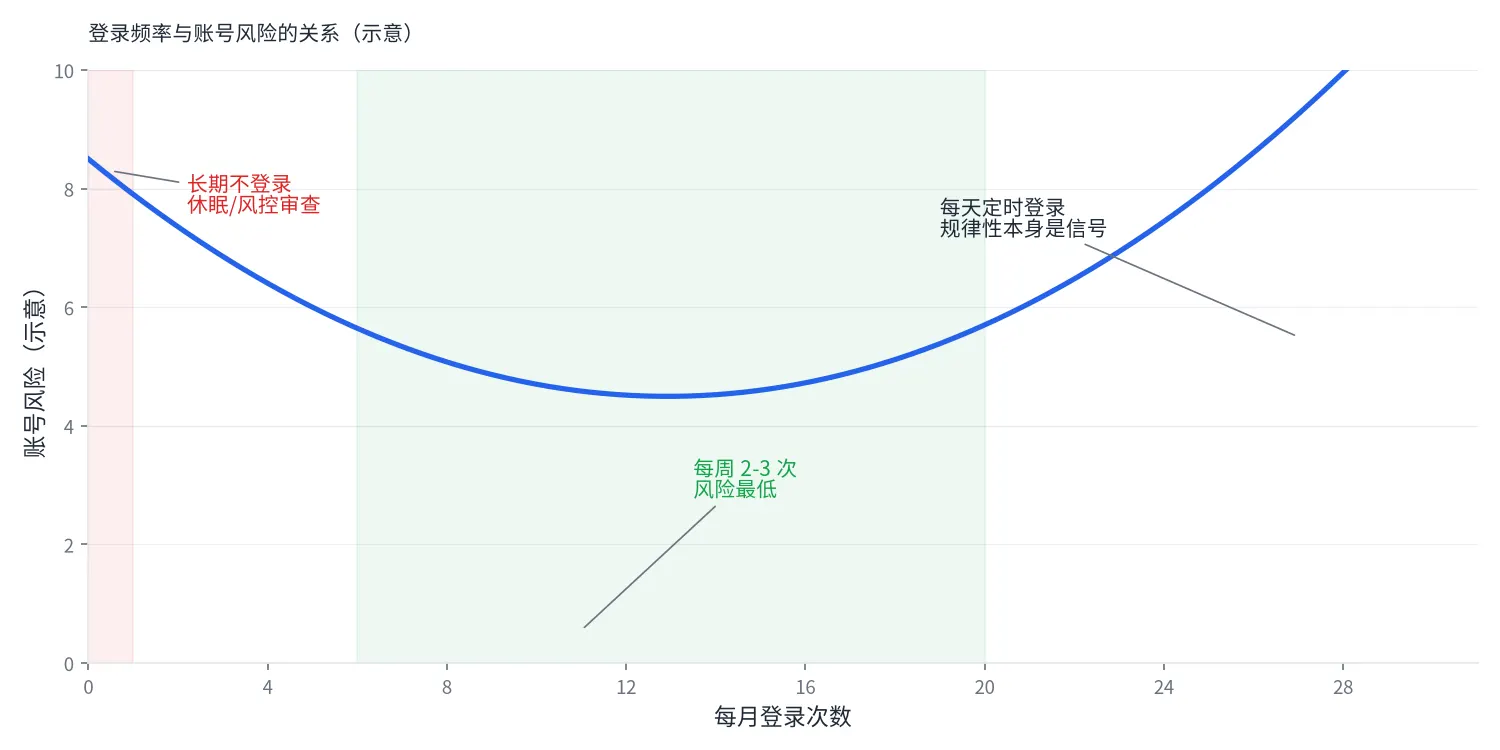
Action Sequence When Things Go Wrong
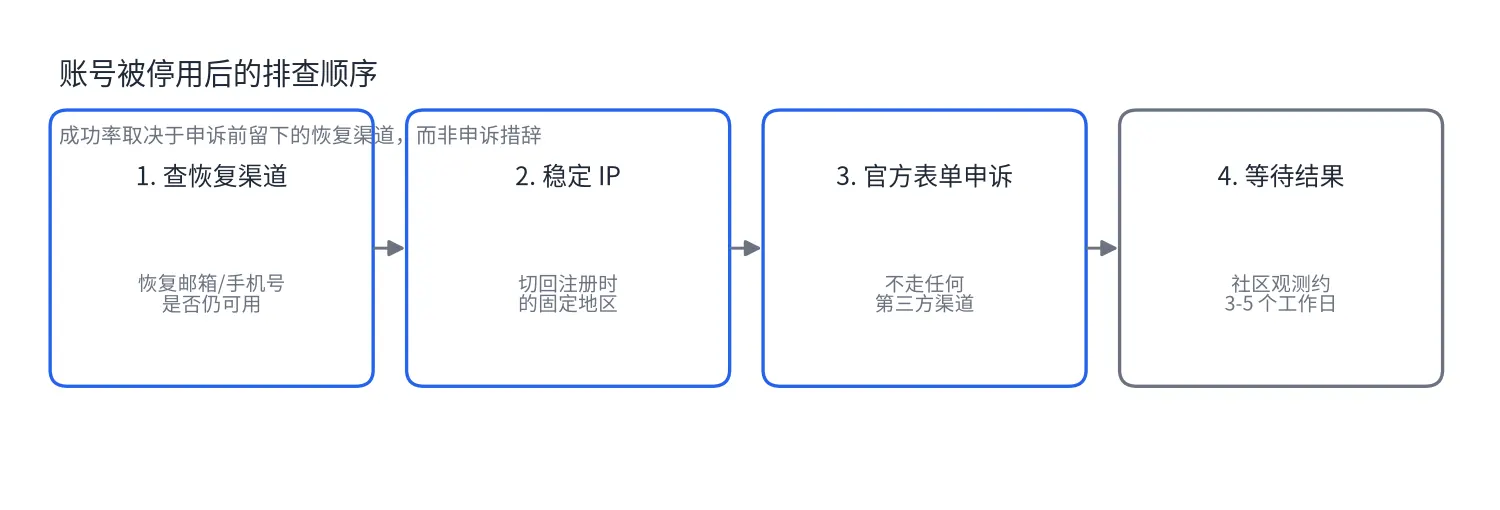
If your account actually gets suspended, recovery success rate depends on the recovery channels you left behind beforehand, not on the wording of your appeal. Follow this order for troubleshooting.
First, check whether the recovery email and phone number still work. This is the only channel for appeal verification, and batch-registered accounts most commonly die at this step: the phone number entered during registration has long since been recycled, and when the appeal verification code is sent, the person who receives it has no idea what it is.
Next, check your IP. If your proxy recently switched nodes or changed providers, stabilize your IP back to the registration region before appealing. An appeal originating halfway across the globe from the registration location has a noticeably lower approval rate.
Use Google’s official account recovery form for the appeal — don’t go through any third-party channels. Results typically come within 3–5 business days. This timeframe isn’t officially promised; it’s a commonly observed value from the account-trading community, and individual cases may take longer.
One final number to leave you with: Google’s Inactive Account Policy explicitly states that accounts with no login for two consecutive years will be treated as inactive, and data may be deleted. Suspension and dormancy travel two different paths — one triggered by risk control, the other by time — but they end at the same destination: the account and its data, gone together.