
From Prompt Writing to Previs First
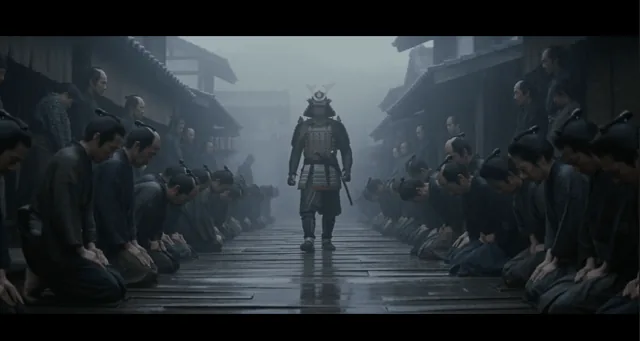
AI video creation is beginning to move from long textual prompting to a more film-like workflow: build a 3D blockout first, then ask the model to render the final shot. QbitAI’s report focuses on updream’s new Previs Studio, a feature that brings a previs-style workflow into an AI creation canvas. Users can create a simplified 3D scene, set camera positions, arrange character movement, record a blockout video, and then send it to video models such as Seedance, Kling, Wan, and Gemini Veo for final generation.
A blockout, also called Previs, is a simplified 3D preview without polished materials or lighting. In film, animation, and game production, it is used to test whether a scene’s staging, camera movement, and timing work before expensive production begins. For AI video, its main role is not to improve visual beauty directly, but to tell the model where objects are, how the camera moves, and how the shot should unfold in time.
Why Text Prompts Hit a Limit

Modern video models can already produce impressive imagery, but they still struggle with strict spatial control. Text can say “the camera slowly pushes in” or “the character walks from the left side of the frame,” but it cannot precisely define speed, distance, occlusion, final framing, or the continuity of a character’s position across cuts. The creator’s idea is first translated into language, and then the model translates that language back into images; important spatial information is often lost in between.
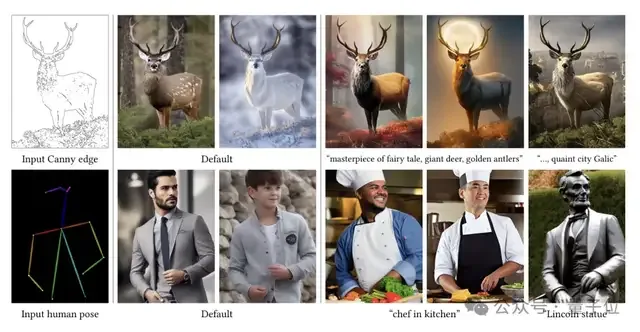
The blockout acts as a spatial anchor. Even rough geometry can define depth, scale, movement space, camera path, and the relationship between characters and environment. This is related to an earlier idea from the Stable Diffusion ecosystem: ControlNet used depth maps, normal maps, and simple pose references to constrain image generation. In video, a blockout can similarly lock down structure while leaving materials, color, lighting, and style to the generative model.
updream describes two levels of blockout control:
- Coarse blockouts: used for action, movement paths, staging, camera motion, cuts, and timing.
- Fine blockouts: more complete structures used for material replacement, color adjustment, and restyling of characters or scenes.
How Previs Studio Works

According to the report, the workflow has four main steps. First, the creator opens updream and creates a Previs Studio node in the canvas. Second, they upload 1 to 3 reference images to generate a scene. Third, they add characters and cameras, then draw movement paths and camera tracks. Finally, they record the blockout video and send it downstream as reference material for video generation.
In one test involving an outdoor wedding scene, the task was started at 18:49 and the generated blockout was ready at 18:53, taking under five minutes. The official tutorial cited in the report says this step usually takes about 4 to 7 minutes. The resulting blockout can be moved, scaled, rotated 360 degrees, and navigated. Character motion can also be assigned as global or local actions.
This lowers the entry barrier compared with building previs manually in tools such as Blender or Maya. However, it is not a one-click filmmaking system. Users still need to understand scene hierarchy, camera placement, motion paths, and shot breakdowns, especially for complex narrative scenes.
What the Tests Showed
QbitAI tested three types of shots that often cause AI video generation to break down. The first was a one-take outdoor wedding shot: a woman in a qipao walks to the third row from the back and sits down. Without a blockout, the background and spatial layout can drift during the continuous movement. With the blockout, the walking route and final camera position were defined in advance, making the result closer to the intended rhythm.
The second test involved multi-camera continuity. AI video models may treat each cut as a new generation task, causing clothing, building layout, screen direction, or character position to change abruptly. By defining the space, character path, camera positions, and cuts beforehand, the Japanese samurai sequence in the report showed better continuity across shots.
The third test used a subway-carriage scene with a tense, horror-like atmosphere. This type of shot can easily suffer from changing character placement or distorted spatial relations. With the carriage layout and character positions locked by the blockout, the generated result became more stable in executing the planned camera movement.
Limits and Industry Direction
Previs Studio improves controllability, but it does not remove every weakness of AI video. The accuracy of the generated blockout depends on the input reference images; if their perspective is flawed, the 3D structure may also be flawed. Very complex movement still needs patience and adjustment. Final outputs can still suffer from character inconsistency or imperfect physical details, which may require inpainting or local editing.
Even with those limits, the shift is significant. As domestic video models compete on baseline generation quality, the next frontier is likely to be reliable control rather than raw output alone. For professional individual creators, previs can reduce wasted attempts, time, and credits. For film teams, it may reduce the cost of early dynamic storyboards. The competitive focus of AI video tools is moving from making a clip to supporting a controllable production workflow. The key change is mental: creators stop guessing how the model will shoot and start deciding how the shot should be made.