Connection closed by 18.183.98.38 port 22 — I stared at that line for a while today.
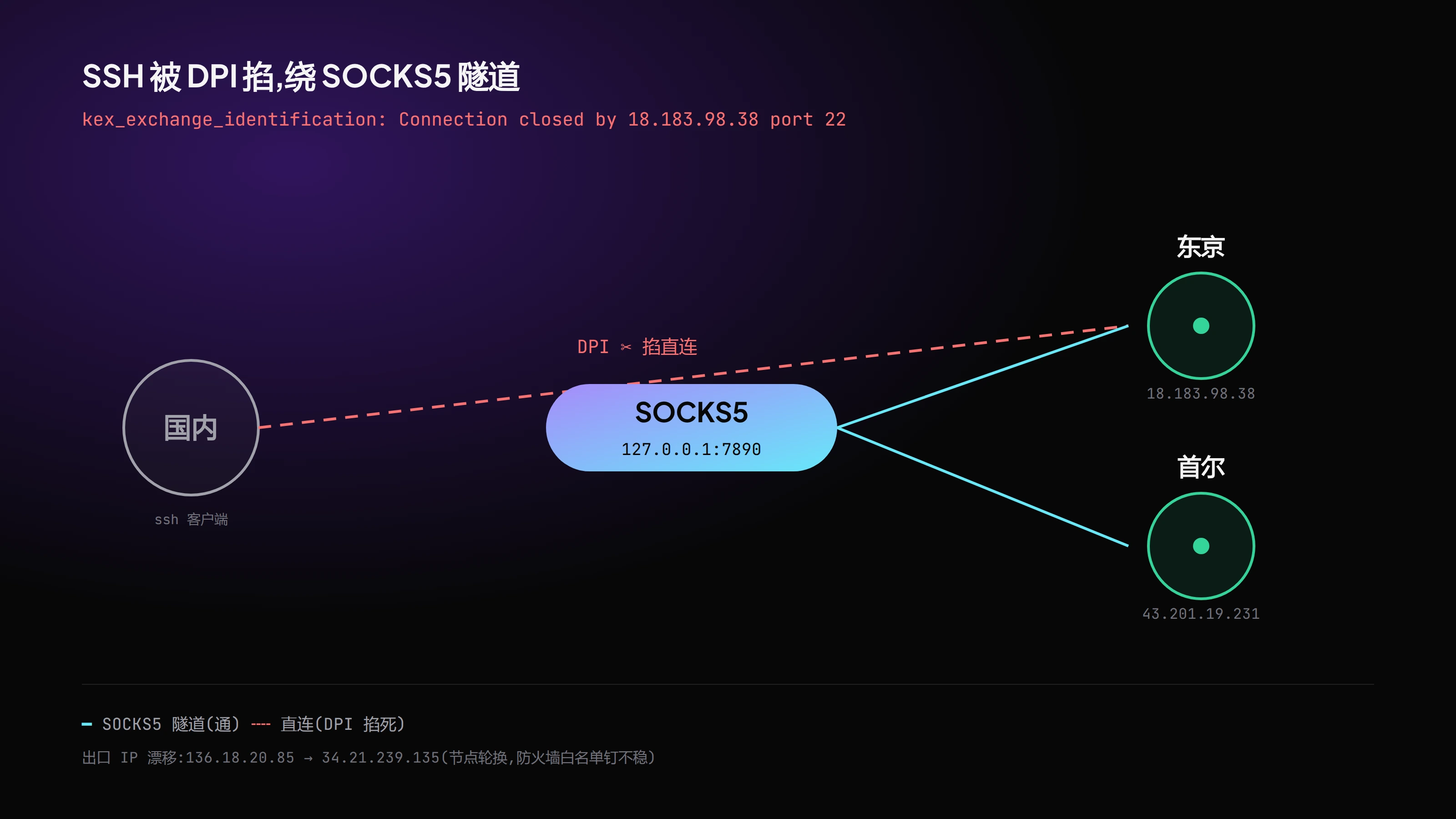
It was supposed to be simple. Spin up two small AWS Lightsail instances, one in Tokyo (18.183.98.38), one in Seoul (43.201.19.231), both 2 vCPU / 2 GB / 60 GB / Ubuntu 24.04, and drop a Nezha probe on them to monitor the little fleet I run. Drop the key, chmod 600 the pem, write two aliases tokyo and seoul into ~/.ssh/config. An hour’s work.
Then ssh tokyo hung.
It “almost” connected
The torment wasn’t that it wouldn’t connect. It was that it almost connected. Knock port 22 with nc and the server banner came back clean — the box was alive, the port open, sshd running. But the moment ssh did a real handshake, the connection died at kex_exchange_identification, intermittently, sometimes through, sometimes not.
This wasn’t an outage. An outage is a clean, full blackout. This was something “taking a look, then selectively killing it.”
It’s DPI
ssh -vv tokyo printed the handshake frame by frame; nc still read the banner. Put the two side by side and the answer was clear: DPI, deep packet inspection. SSH handshakes to overseas port 22, direct from inside China, get identified and disturbed by something on the path. The nc traffic was too short, too plain-TCP, to trip the rule; the SSH key-exchange handshake was too distinctive, so it got marked.
First instinct, wall
The instinct was: proxy it. Then I hit the second pit: set Clash to DIRECT for these two IPs — still died at the same kex_exchange_identification.
Only later did I separate the two: one was DPI killing it on the ISP link, the other was Clash’s TUN intercepting the raw-IP handshake of the rewritten-DIRECT traffic. Identical error, different root, opposite fix. Roughly half of today vanished into “mistaking two identical-looking pits for the same one.”
Stuff SSH into a tunnel
What actually worked was pushing the entire SSH session through Clash’s SOCKS5 tunnel via ProxyCommand:
| |
Meaning: ssh doesn’t connect to remote 22 itself; it first dives into the local 7890 SOCKS5 exit and lets the proxy carry the handshake to Tokyo. The moment ssh tokyo connected in under a second, I let out a long breath. seoul is the same, copy one line.
Even the manual labor wasn’t clean
~/.sshhad bothAWS1.pemandaws1.pemlying there — Linux is case-sensitive, those are two different files, point at the wrong one and it’sPermission denied. I burned real time today on “which one am I actually using.”- Nezha had to be v0.20.13, not v2. I wanted the glassmorphism panel, only v0 adapts to it; v2 renders a different face.
- Tokyo runs Dashboard + Agent, Seoul is pure Agent, Web bound to
127.0.0.1:8008, gRPC open on0.0.0.0:5555. The panel isn’t directly exposed — wrap it in another cloudflared tunnel before you can even reach it. - Retired the old Tokyo instance (
18.180.158.164+lynxflow-aws.pem) along the way — ssh to that old box alone took 4 retries.
The idea I couldn’t close
I’d meant to lock the Lightsail firewall on port 22 down to the proxy exit IP. Probed the exit: 34.21.239.135 (Google Singapore). But a few hours earlier I’d written down 136.18.20.85.
Nodes rotate; the exit IP drifts. Nailing a firewall allowlist to an IP that changes is nailing nothing. Noted that trap today; a different approach is needed later.
Why it was so exhausting
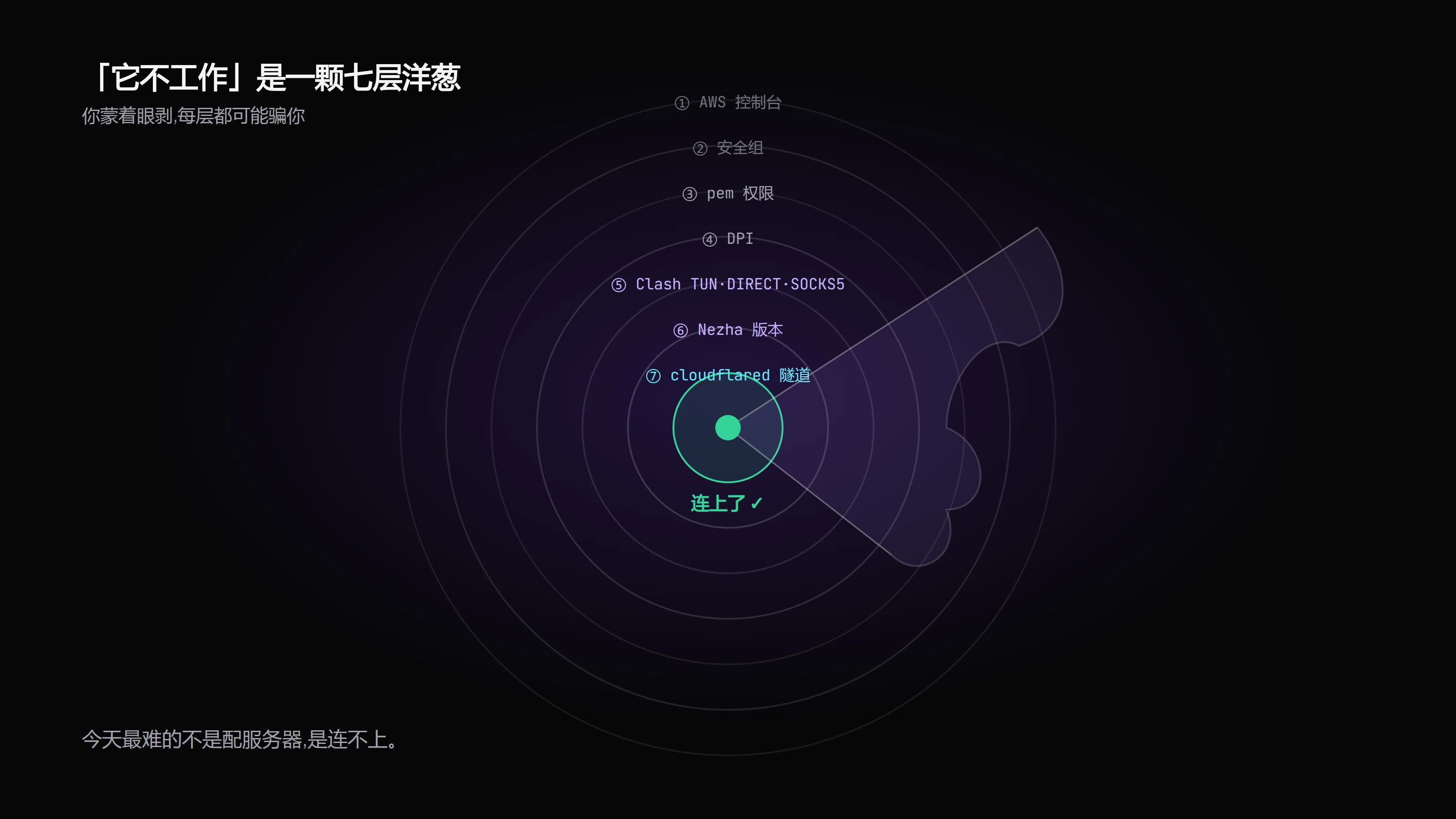
Looking back, the exhaustion wasn’t from command count — it’s half an hour of typing. It was that every layer had a “silent failure” mouth: the AWS console, the security group, pem permissions, DPI, Clash’s three modes (TUN/DIRECT/SOCKS5), the Nezha version fork, the cloudflared tunnel, the drifting exit IP… any one off, and the symptom is the same single sentence: “won’t connect.”
You don’t know which layer is lying to you, so you peel one at a time, and each layer demands a different tool, a different head (nc on the port, read the banner, grab the -vv handshake, check TUN logs, probe the exit IP).
“It doesn’t work” is never one fault. It’s a seven-layer onion, and you peel it blindfolded.
Now
Two small dots lit green on the Nezha panel, Tokyo and Seoul, heartbeats ticking, traffic drawing. Two 2 vCPU / 2 GB boxes, across a DPI-watched link, through a drifting SOCKS5 exit, wrapped in a cloudflared tunnel, connected, stable.
Hard, genuinely. Worth it.