
Origin: Three Edits, Zero Effect
I opened ccswitch (v3.19.2, the Windows-side Claude Code config switcher), clicked “edit provider,” changed the Opus-tier model, and saved. Restarted Claude Code — still running the old model. Edited, saved, restarted again — still no change.
“Doesn’t change” problems are the worst kind to guess at. Below is the process of forcing out the root cause with logs and a field-by-field database comparison. The conclusion is more tangled than intuition: the write succeeded; the fault is three things stacked.
First, Clear Two Likely Suspects
Suspect one: write failed (atomic-write os error 50). WSL2 writing Windows-side files over the 9P bridge historically rejects rename, reporting os error 50. But the mtime on ~/.claude/settings.json shows it was just written successfully; ccswitch’s own database was written in the same second, with a pre-switch backup. The write path is clear — ruled out.
Suspect two: WSL and Windows are two different files. Checked: ~/.claude/settings.json is a symlink pointing to the same file on the Windows side. What ccswitch writes on Windows is what Claude Code reads in WSL — one file — ruled out.
Falsifying these two first saves a lot of flailing in the wrong direction. It’s also the first step for any “looks like it didn’t take” problem: confirm whether the write actually happened before fixing things that aren’t broken.
Root Cause One: Three-Layer Model Override
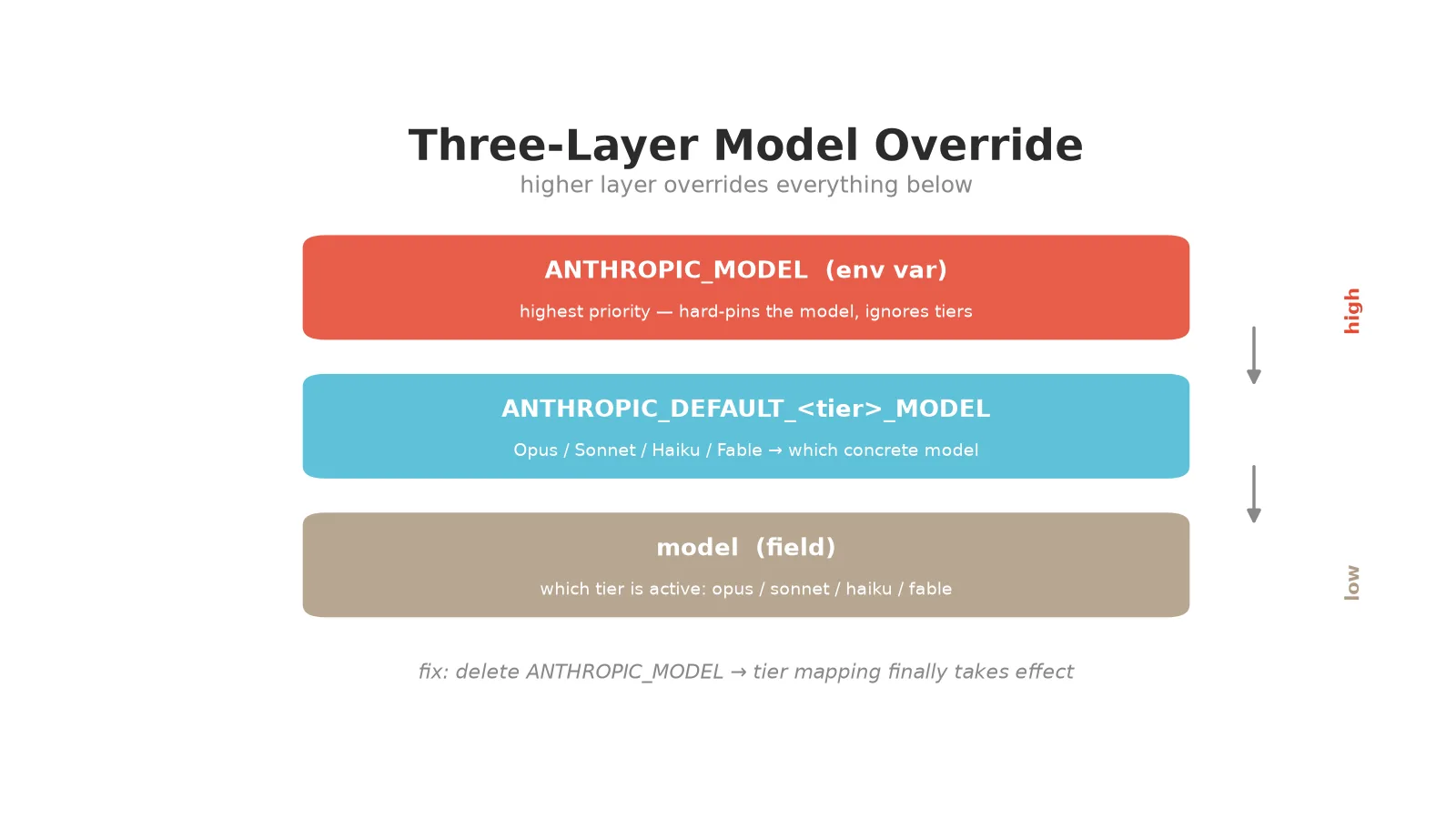
Claude Code decides “which model actually runs” not from one field but from three layers stacked, priority high to low:
ANTHROPIC_MODELenv var — highest priority. Once set, it forces every request to this model, overriding the two layers below.ANTHROPIC_DEFAULT_<tier>_MODEL— “which concrete model each Opus/Sonnet/Haiku/Fable tier maps to.”modelfield — which tier is active (opus/sonnet/haiku/fable).
My config had all three fighting: model: "opus" (Opus tier), Opus tier mapped to model A, but ANTHROPIC_MODEL hard-pinned to model B. The highest layer presses down and the two below go inert — whether you edit the Opus tier mapping or switch the model field, it runs model B.
That’s the first reason “editing had no effect”: you think you’re editing the tier mapping, but the hard-pin sits on top and the tier mapping never gets a word in.
Root Cause Two: ccswitch’s “Edit” and “Apply” Are Two Separate Actions
This the logs forced out. In the time window of this operation, ccswitch’s log only records:
| |
That is: “click edit, change model, save” only writes into ccswitch’s own database providers table (template updated successfully, cloud sync even fired), but does not therefore push the new template into the .claude/settings.json that Claude Code actually reads. To push to live you have to separately click “switch/apply provider.” On startup ccswitch only does a reverse check (should it backfill from live into the DB), never proactively pushing the DB to live.
So: your edit took effect in the database, the live file didn’t move, Claude Code reads the old. Second reason — you did “edit,” not “apply.”
Root Cause Three: DB Template vs. Live File Drift
Pull the template for this provider from the DB and the actual values from the live file, compare field by field — the four tier mappings are all rotated one position off:
| Tier / field | DB template (after edit) | live file (actually running) |
|---|---|---|
| Opus tier | qwen3.8-max | glm-5.2-fast-preview |
| Sonnet tier | glm-5.2-fast-preview | deepseek-v4-flash-0731 |
| Fable tier | deepseek-v4-flash-0731 | qwen3.8-max |
ANTHROPIC_MODEL | glm-5.2-fast-preview | qwen3.8-max |

Not one field wrong — multiple DB edits while live stayed parked at an old switch point, drifting further apart. Even if you go back and click “switch” to make ccswitch push live, it pushes this drifted template and stays messed up. Also note the DB template only contains the env block, not the top-level model and effortLevel fields — that’s ccswitch’s design, but it does make “fully manage models through ccswitch” awkward.
Fix: Delete the Hard-Pin, Let Tiers Speak
Minimal fix: delete the ANTHROPIC_MODEL hard-pin, the highest-priority layer. Once gone, model field picks tier → tier mapping → actual model — that chain finally flows. Paired with sorted tier mappings (Opus=primary, Sonnet=hard tasks, Haiku=light work, Fable=max-score), deleting the pin lets tier division take effect.
After editing you must restart Claude Code — env is injected into the process at startup; editing the file doesn’t affect a running session. The current session keeps old values; fully quit and reopen to read the new config.
How to verify: after restart, use /model to switch to the Sonnet tier and check whether the actual model became the one Sonnet maps to. If it changed, the tier-mapping chain is live.
Daily Path: Skip ccswitch, Edit settings.json Directly
Once diagnosed, the least-effort path is the plainest: don’t use ccswitch day-to-day, edit ~/.claude/settings.json directly. Because the only reason “couldn’t change” happened is ccswitch’s switch overwrites live with the stale DB template; don’t touch it and that overwrite path doesn’t exist — settings.json becomes your single source of truth.
One iron rule: don’t open ccswitch and click “switch/apply provider” again. One click triggers the full overwrite (drifted tier mappings, hard-pin, lost keys all return). Don’t click, edit and restart. For daily tier switching Claude Code’s built-in /model works too — it’s just editing settings.json’s model field, equally persistent under “no ccswitch.”
Honest Boundaries
- The three-layer priority ordering is static inference plus system-echo corroboration (“settings.json pins X — applies on restart”). Which layer ultimately wins after restart, I didn’t field-test each one — that’s for you to verify on restart.
- Conclusions target ccswitch v3.19.2. The day of writing, v3.20.0 update was detected; whether it fixes “edit doesn’t push live” is unknown.
settings.local.jsonhas higher priority thansettings.json. If local also sets a same-named model field, it overrides settings.json — don’t forget to check local when diagnosing.
How to Check Yourself
Reproducing this diagnosis comes down to four commands (swap paths and keys for your own):
| |
Compare the template from step 3 against the live values from step 2, field by field — fields that don’t match are drift points. If step 4’s log has no “apply to live”-type event, that confirms “edit doesn’t push live.”
For any “config edited but didn’t take” problem, the approach is universal: light up every segment of the data flow — did it get written? Is what’s written the same as what’s read? When reading, which priority layer overrode the one you edited? Walk those three and the root cause surfaces on its own.