
Key Announcement
- Release Date: September 22, 2026 (announced); reported September 24 by IT之家
- Version: Chrome 154 Stable Channel
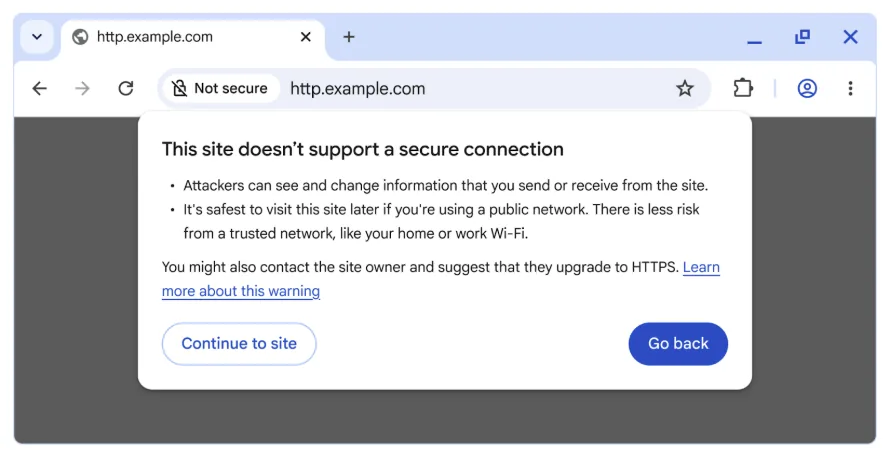
- Main Feature: Default HTTP site warnings; Automatic enforced secure connections
- Security Fixes: 108 vulnerabilities patched, including multiple “Critical” severity items
- Affected Components: ANGLE graphics layer, GPU, WebGL, Service Worker, Full-screen API, Dialog boxes
- Availability: Rolling out to all users; enabled by default starting October 2026
Enhanced Security: “Always Use Secure Connections” Goes Live
Chrome 154 officially introduces the “Always Use Secure Connections” feature, with default activation beginning October 2026. The mechanism does not block HTTP access outright but uses intelligent warnings: when users attempt to access non-encrypted public sites, a confirmation dialog appears before connection proceeds; warnings trigger only on first-time or infrequently visited insecure sites, while repetitive warnings for frequently accessed HTTP sites are suppressed with user preference remembered.
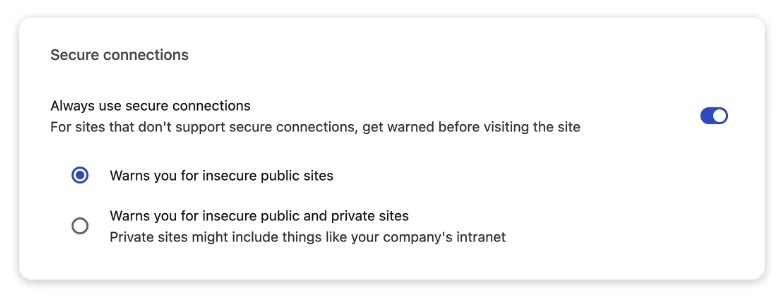
For flexibility, users may choose whether the feature applies to public sites only or extends to private networks (e.g., corporate intranet) — accommodating both home users and enterprise IT needs.
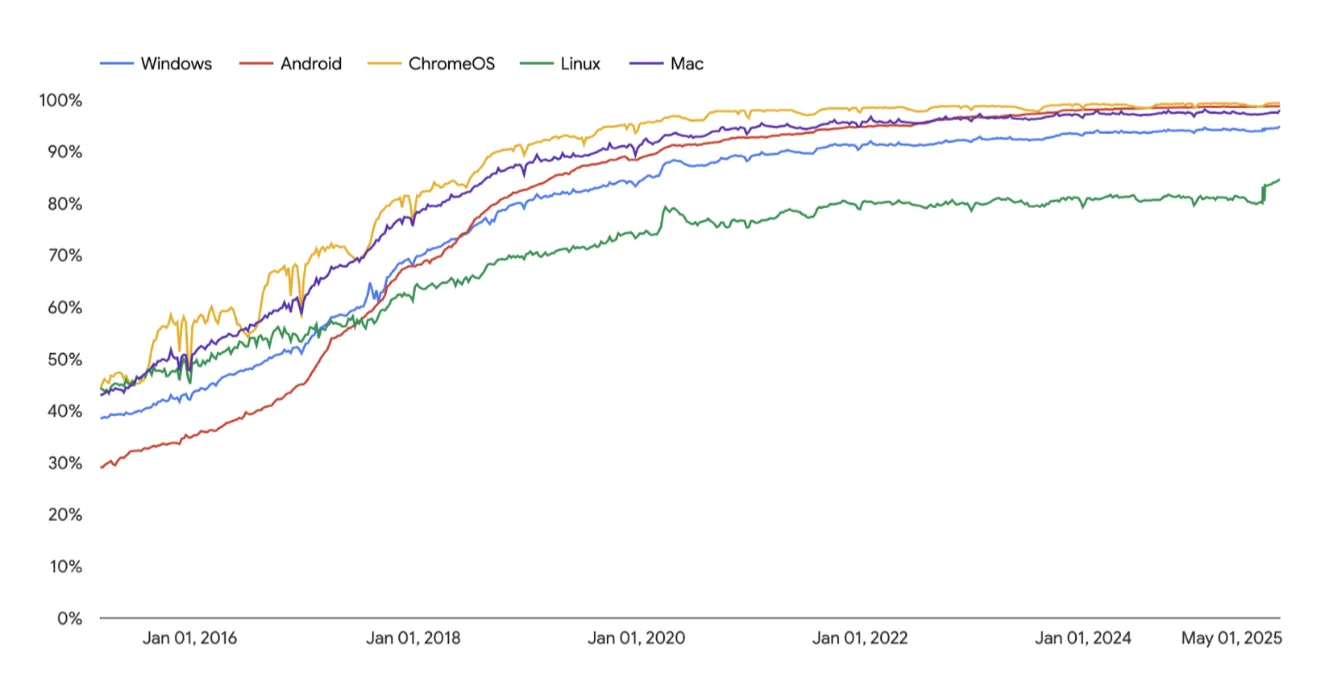
According to Google’s HTTPS Transparency Report, HTTPS adoption for public websites has plateaued at a high level: 30%–45% in 2015, stabilizing at 95%–99% by 2020. This means most end users will rarely encounter warning prompts, resulting in minimal experience disruption.
Security Patching: 108 Fixes including Critical-Level Issues
This update patches 108 security vulnerabilities, with multiple labeled “Critical” severity:
- ANGLE graphics layer: Historical flaws could enable remote code execution
- GPU module: Multi-process GPU sandbox escape vulnerabilities
- WebGL: Memory corruption risks when parsing malicious files
- Service Worker: Cache manipulation vulnerabilities exploitable for phishing
- Full-screen & Dialog APIs: UI redressing attacks (e.g., address bar obscuring) mitigated
Exploitation of these flaws could enable MITM attacks, data interception/tampering, and malware injection — highlighting the importance of prompt updating.
Phased Transition Timeline
Google adopted a gradual rollout approach:
| Version | Date | Event | Estimated Affected Users |
|---|---|---|---|
| Chrome 147 | April 2026 | “Always Use Secure Connections” enabled by default for Enhanced Safe Browsing users | 1 billion |
| Chrome 154 | September 2026 | Stable release; featureisonfig | All users |
| Chrome 154 (Oct 2026) | October 2026 | Feature fully enabled by default; HTTP site access requires confirmation | All users |
Google strongly recommends developers and IT professionals test this setting in staging environments to identify legacy HTTP dependencies. WARNING: Management interfaces (routerisAdmin pages, device consoles) still using HTTP may face access barriers — consider self-signed HTTPS or local HTTP whitelisting.
Recommendations for Readers
- End users: No action required; upgrade to Chrome 154 for default protection; use “Remember this choice” to suppress repetitive prompts
- Website admins: If still serving HTTP (including IP-based access), deploy HTTPS immediately; intranet systems can use self-signed certificates
- Enterprise IT: Deploy group policies or enterprise config to control scope (public vs. private sites) for the secure connection feature
Final Thoughts
With HTTPS adoption exceeding 95%, encrypted transport has become foundational. Chrome’s gradual approach strikes a balance between immediate security gains and real-world operational realities — marking the industry’s transition from “optional encryption” to “security by default.”.