
Google announced a broad set of AI study features for Search and Gemini on Wednesday, positioning the two products as connected tools for learning, practice, research, and visual explanation.
Search becomes a more interactive study surface
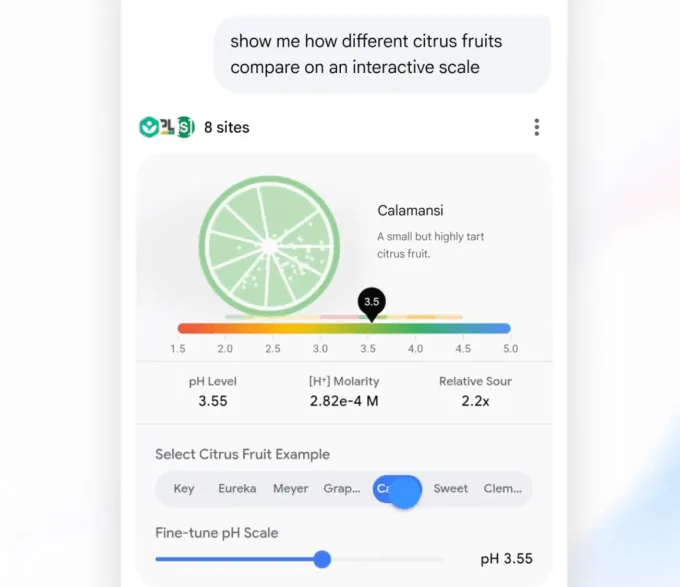
The new Search features are designed to move beyond links and short summaries. Students can now generate custom tools and simulations for complex topics. For instance, a search for “pH scale” can produce an interactive visual inside an AI Overview, while a follow-up request such as placing citrus fruits on the pH scale can trigger a more tailored experience through AI Mode.
In simple terms, AI Overview is Google’s AI-generated explanation layer in Search, while AI Mode is a more generative and conversational search experience. The notable shift is that Google is turning Search into a place where students can build learning aids, not just find web pages.
Search will also generate customized practice quizzes across subjects including science, math, humanities, and foreign languages. A student preparing for the SAT, for example, can ask Search to create a quiz using commonly tested vocabulary words, and receive an interactive quiz directly in the product.
Lens and uploaded files extend the workflow
In the coming weeks, Lens in Search will add an interactive learning experience for students working through problems. Users will be able to tap the Lens camera icon in the Google app, upload a photo of their work, and ask AI to explain the relevant concept, identify possible mistakes, and provide guidance when they are stuck.
Google is also adding study-document creation from uploaded files such as PDFs, documents, slides, and more. One example given by the company is uploading a photo of handwritten notes alongside lecture slides to generate a one-page summary of key concepts.
Key Search-side updates include:
- AI-generated interactive visuals and simulations;
- custom quizzes for a wide range of subjects;
- Lens-based problem guidance using uploaded photos;
- study documents created from uploaded files.
Gemini adds research reports and 3D simulations

On Gemini, Google is introducing a feature that lets students launch multi-step research reports in Gemini Live and then discuss the findings conversationally. A user can ask Gemini to research a topic, leave the chat or do something else while the report is generated in the background, and receive a notification when it is ready. After that, the student can use voice to ask follow-up questions or talk through the findings.
Gemini Live refers to Gemini’s real-time conversational experience, especially suited to spoken interaction. Pairing it with research reports could make the study process feel closer to a dialogue with a tutor, though the source text does not specify availability details, citation behavior, or account requirements.
Gemini can also now generate functional 3D simulations, with responses that may include tables, grids, and prompt-specific simulations. Google’s example is asking to see how DNA works in 3D, then rotating and zooming into a 3D DNA structure. For learners, this matters because some topics are easier to understand when abstract relationships become visible and manipulable.
A dedicated hub signals a platform strategy
Google is also launching a dedicated hub inside the Gemini app that gathers its learning tools in one place. Students will be able to start a study notebook, create flashcards, take practice quizzes, and access other learning features from the hub.
The broader message is clear: Google wants Gemini to become a default AI assistant for students, while Search remains a primary entry point for everyday learning questions. The company is competing not only with OpenAI but also with education-focused startups such as Knowt and Gauth, which offer their own study and practice tools.
The AI education market is shifting from simple answer generation toward full learning workflows: explanation, visualization, practice, correction, note organization, and conversational follow-up. Google’s advantage is distribution across Search, Lens, Gemini, and file-based workflows. Its challenge will be making these tools reliable and useful enough that students treat them as study companions rather than shortcuts.