
Overview: Project Zenith Launches with Clear Hardware Benchmarks

Microsoft officially launched Project Zenith on September 4, 2024, delivering a preconfigured development environment for Windows 11 developers. Rather than a standalone software product, Project Zenith is an OEM hardware certification program—systems arrive with Windows, tools, and settings already tuned for development workflows.
Key facts:
- Release date: September 4, 2024
- OS requirement: Windows 11
- Minimum specifications: 64 GB unified memory, memory bandwidth ≥ 250 GB/s
- First chip: AMD Ryzen AI Halo
- Availability: Preinstalled on OEM devices; partners will expand offerings in coming months
Configuration Philosophy: Remove Friction, Add Focus
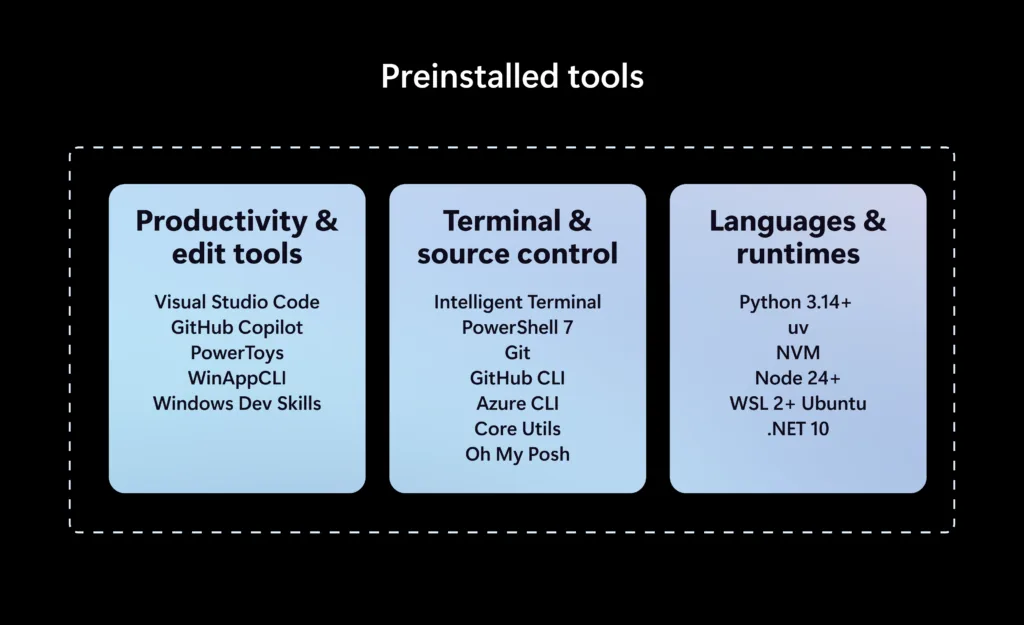
The design philosophy of Project Zenith combines hardware readiness with UX streamlining. It aggregates several earlier Microsoft developer investments—WSL (Windows Subsystem for Linux, enabling Linux containers on Windows), Windows Terminal, WinGet, Windows Port of Coreutils, and on-device AI capabilities—into a cohesive baseline.
Specific default configurations include:
- Windows Terminal and Visual Studio Code pinned to the taskbar for instant access
- File Explorer shows file extensions, hidden files, full path in title bar,信息 pane enabled, with long path support (260+ character paths) activated
- Disables recent files/folders history and sync provider hints to minimize distractions
- Deep WSL integration allows direct creation, execution, and management of Linux containers from Windows
Crucially, Project Zenith does not mandate a single workflow: users retain full flexibility to override language choices, frameworks, third-party tools, or Windows personalization—preserving developer autonomy.
Local AI and Security Integration
The standout feature is on-device AI capability: support for models exceeding 30 billion (30B+) parameters. Developers can conduct repeated AI-assisted coding experiments without cloud dependency or per-token billing, a significant advantage for fine-tuning and debugging large models in privacy-sensitive or offline settings.
Microsoft positions Project Zenith under its broader Windows Agents strategy, inheritancing enterprise-grade security: Windows Hello for authentication, process isolation via HVCI (Hypervisor-protected Code Integrity), and central management via Microsoft Intune. Security requirements are built in, not bolted on.
Who Should Act, Who Should Wait?
Proceed with Project Zenith devices if you:
- Develop AI/ML applications requiring frequent local large-model testing
- Prioritize rapid environment setup over extended customization
- Work in teams需要 standardized yet flexible workstation policies
Hold off if you:
- Current hardware falls below the 64 GB memory threshold with no upgrade budget
- Primarily use C#/Visual Studio for classic desktop apps and rarely leave the Windows ecosystem
- Rely heavily on cloud-based AI services with acceptable latency/cost trade-offs
Final Thoughts
Project Zenith synthesizes Microsoft’s fragmented developer tooling into a certified hardware experience. Its innovation lies not in reinventing the stack, but in certifying hardware that meets ambitious on-device AI demands—making high-end local developmentexportable as a repeatable, enterprise-ready template.
(Word count: ~950 English words)