
OpenAI Unveils Dots for Professional Users
OpenAI has officially launched Dots—an autonomous AI assistant system designed to operate continuously in the background, executing multi-app tasks on behalf of users. This announcement was made during the company’s DevDay event on Tuesday. Key release facts:
- Launch date: Starting today for select tiers
- Eligibility: ChatGPT Pro, Business Premium, and Enterprise subscribers
- Underlying model: Powered by the GPT-6 Astra architecture
- Initial limit: One Dot per user (multi-agent deployment planned)
- Usage policy: Conversations with Dots do not count toward ChatGPT usage limits
- Auto-learning: Dots adapt and personalize outputs during execution
Dots represent OpenAI’s response to Meta’s Muse AI assistant. Unlike conventional chatbot interfaces, Dots function as agentic AI—capable of orchestrating multi-step workflows autonomously after a high-level instruction. Notably, Dots consume no token quota, a strategic decision that enables organizations to scale automation without additional billing impact.
Architecture and Interaction Models
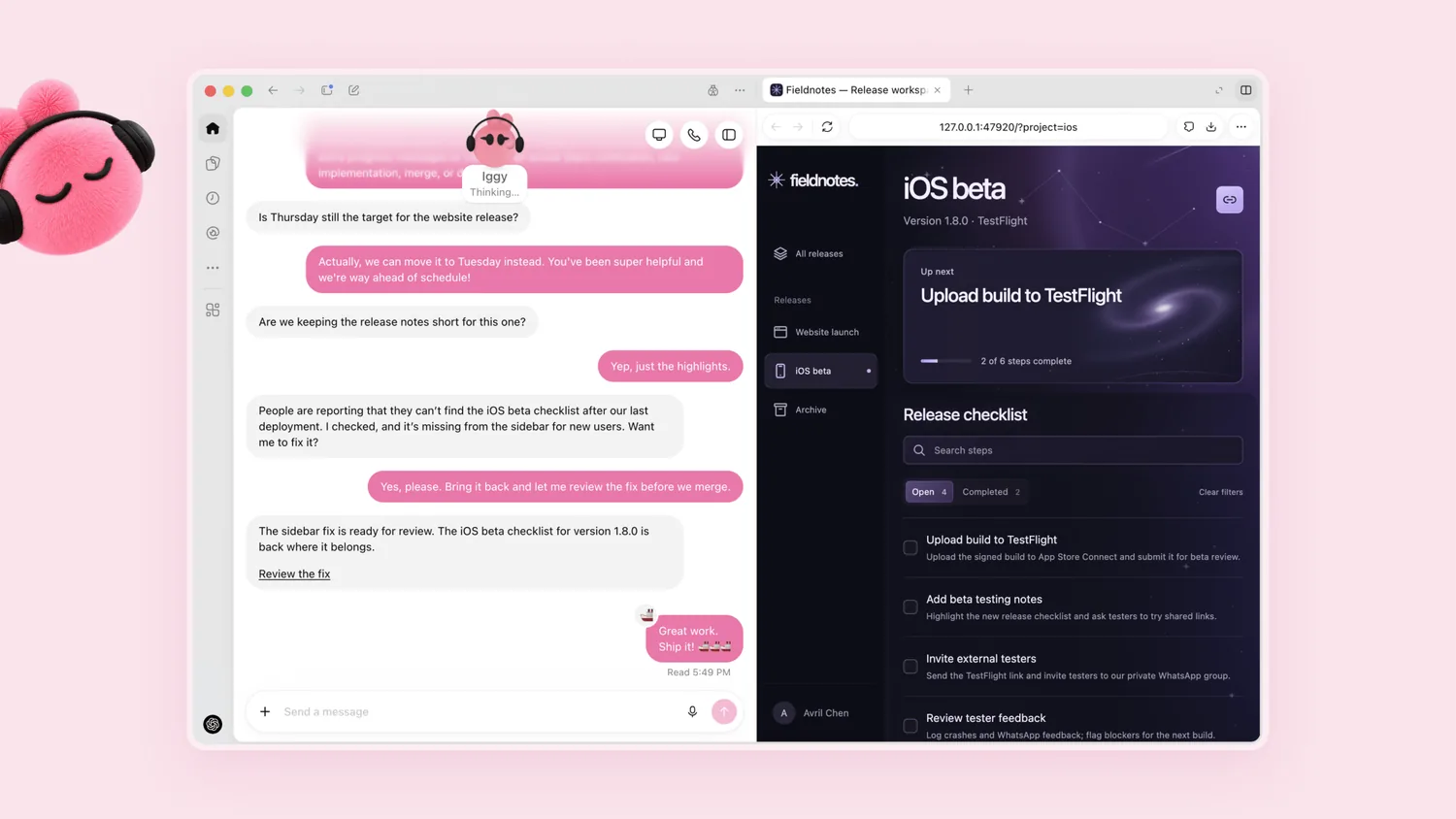
Each Dot operates with its own dedicated cloud computer and can interface with web browsers and over 4,000 integrated applications. The typical workflow begins with a user submitting a task via a messaging-style interface, resembles Muse’s chat experience. The Dot then dissects the request, coordinates actions across apps, pushes progress updates and clarifying questions in real time, and ultimately delivers outputs, sometimes with visual demonstrations.
Supported interaction modes include:
- Text-message-style interface for asynchronous task management
- Voice call capability via ChatGPT on web, desktop, and mobile platforms
- Deep integration with Microsoft Teams and Slack, preserving task context across platforms
- SMS-based voice interaction coming soon
Users can monitor execution live through the Dot’s cloud computer module. For instance, a developer can inspect inline code commits, review testing logs, and view video walkthroughs of UI changes; a content creator can browse annotated interview clips, revised show notes drafts, and social copy iterations. OpenAI emphasizes this is not a passive playback log but an interactive workspace with editable outputs.
Safety Layers and Enterprise Features

In response to safety concerns raised around Muse—such as an incident where a user’s address was disclosed unintentionally—Dots embed three protective mechanisms:
- Built-in guardrails: Define baseline autonomous behavior boundaries
- Custom rules engine: Allow users to block operations or set approval triggers
- Auto-review module: Pre-action validation against rules; automatic escalation for sensitive actions (e.g., password changes)
On the enterprise front, organizations can deploy role-specific Dots—for example, a support agent Dot that auto-classifies incoming tickets or a marketing Dot that syncs content calendars with team workflows. These specialist agents inherit context from user sessions across devices and platforms.
Who Should Act Now
Ideal early adopters:
- Developers using feedback loops to build and test features automatically
- Content teams needing transcript analysis, clipping, and social repurposing
- Operations staff requiring cross-tool alert triage and task assignment
Wait-and-see users:
- Organizations requiring specific compliance certifications (currently not disclosed)
- Non-ChatGPT Pro/Business/Enterprise subscribers (currently gatekept by tier)
A Final Note
Dots mark a shift from reactive query-response AI to proactive, continuous agents. The decision to exclude usage from quotas underscores OpenAI’s focus on predictable enterprise deployment economics. If multi-agent coordination and on-demand scaling prove reliable, Dots may evolve into embedded organizational infrastructure rather than an extra tool.