
Why the Eyes in AI Short Dramas Finally Look Natural — A Reverse-Engineering of Seoul’s a Bit Reckless Today
Was scrolling through Douyin and came across a short drama compilation called Seoul’s a Bit Reckless Today, tagged with LibTV. My first impression was unlike most AI short dramas: the characters’ eyes had focus, tracking whoever they were talking to; expressions had arcs—a smile would unfold gradually rather than snapping onto the face; in the bickering scenes, the tension between the two characters’ gazes felt real. It looked “especially natural and expressive.”
That raises a question: is this naturalness the result of prompts being written in enough detail, or is something else going on?
To answer that, I dug out the full production tutorial for this short drama. There’s a 3-hour-12-minute end-to-end practical course on YouTube, the title of which literally reads “Jimeng Seedance 2.5 + LibTV for Making AI Live-Action Short Dramas,” with chapters spanning everything from scriptwriting through to secondary editing. I downloaded the entire video, extracted frames, and analyzed them. Here’s the conclusion up front: prompts are just the final layer. What actually makes the eyes and expressions natural is a three-tier structure: character assets first, multi-image reference constraints, and the model’s own acting ability. Writing detailed prompts certainly helps, but they only pay off because the first two layers have already laid the groundwork.
Let’s look at the evidence chain first
The finished sample clips shown at the start of the tutorial share the same visual quality as Seoul’s a Bit Reckless Today:
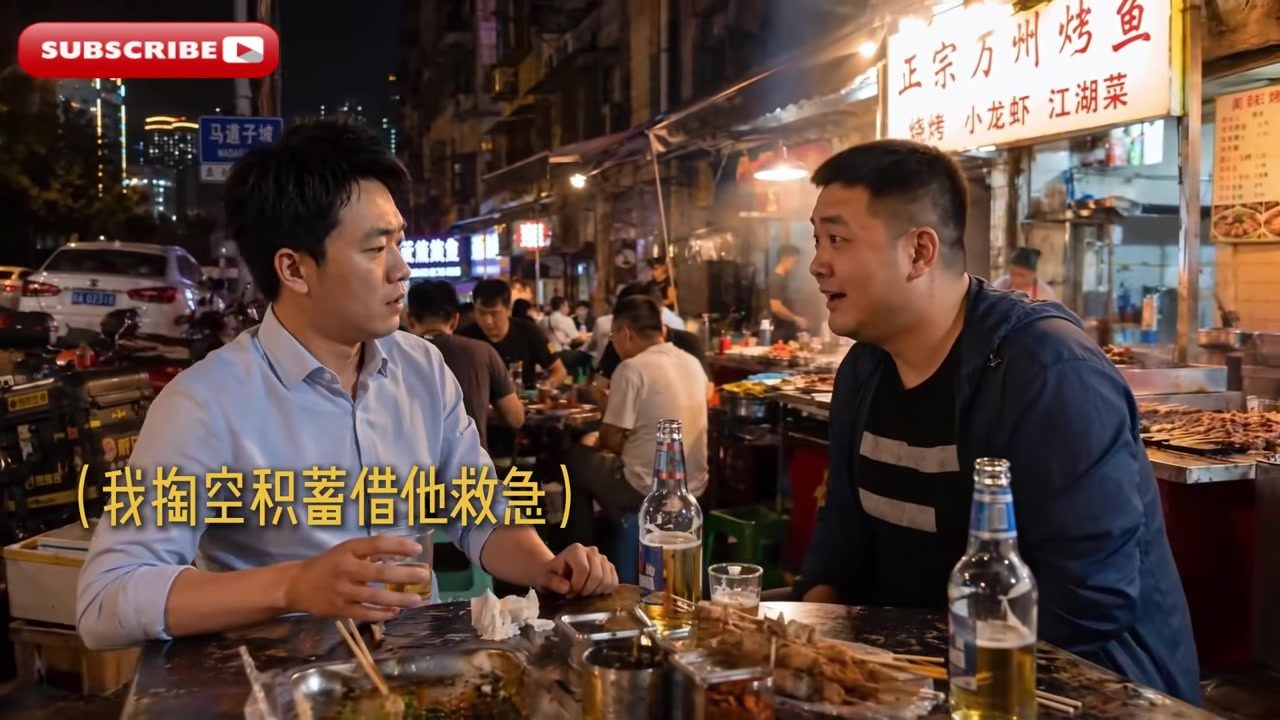
Night market stall, two male characters sitting across from each other at a table. Running these sample shots through a visual model frame by frame, the assessment is remarkably consistent: skin texture, the atmospheric warmth of the environment, and the alignment of both characters’ gaze directions are all close to live-action. Flaws exist too—background characters’ details are muddy, and the mouth interior during speaking moments shows generation artifacts. The “naturalness” is a product of engineering trade-offs: parts that easily break the illusion (hand close-ups, extended dialogue shot/reverse-shot) are sidestepped with camera language, while the strengths (static expressions, lighting, skin texture) are pushed to the foreground.
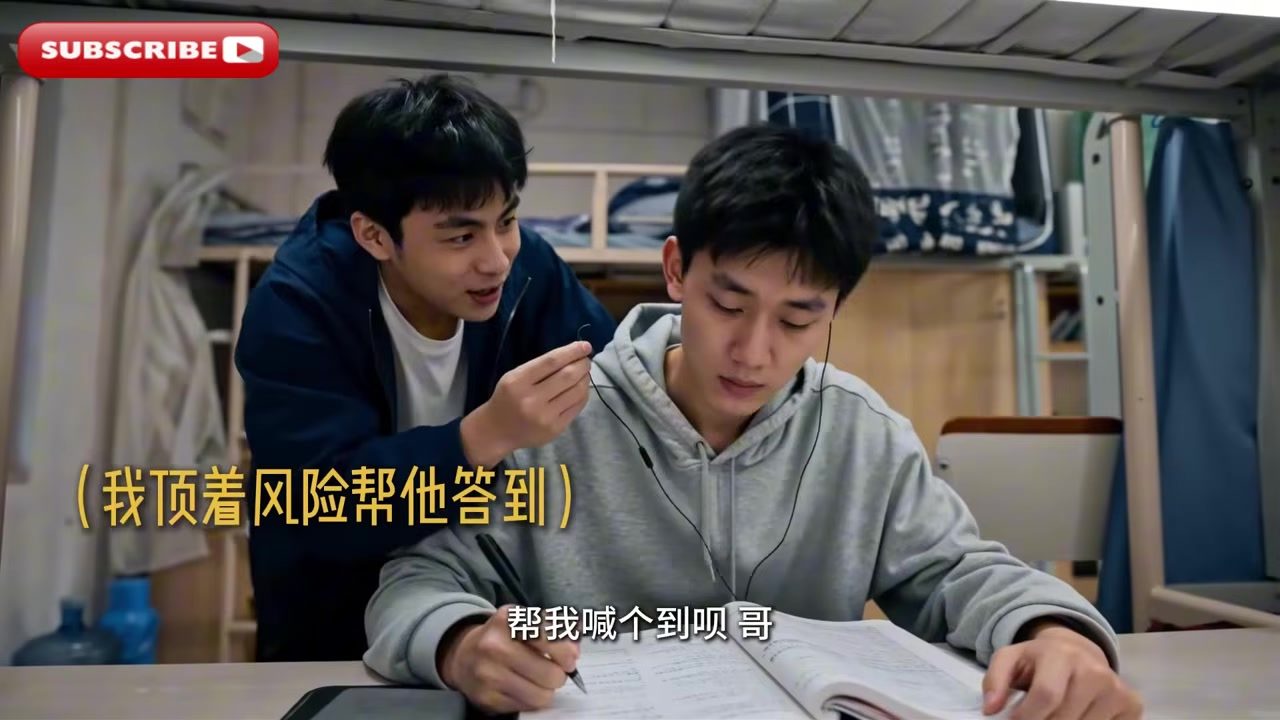
In the dorm scene, the “help me check in for attendance” shot—sitting there—carries a sly, mischievous look; the one writing with their head down shows a passive expression. These emotional states are readable even in a single frame. My overall assessment of the entire sample set: it’s constructed from multi-reference-image-generated short clips, each 5–15 seconds, spliced together, with editing rhythm masking the physical discontinuity within any single shot.
Tier 1: Character assets come first, not prompts
The chapter order of the tutorial reveals the actual production sequence:
- Introduction & tool overview (Jimeng basic features, Seedance 2.5’s four major advantages, LibTV basic features)
- From story to script
- Prompt structure (the RTCF framework)
- Assets: character, scene, and prop design
- Storyboarding and camera movement
- Dialogue scenes and action scenes
- Shot-by-shot video generation and editing
- Secondary editing
Note step 4. Most people’s mental model of AI video is “write a description → generate video,” but this pipeline runs in reverse: first, a complete character asset library is built for each character, and then all shots draw from that library.
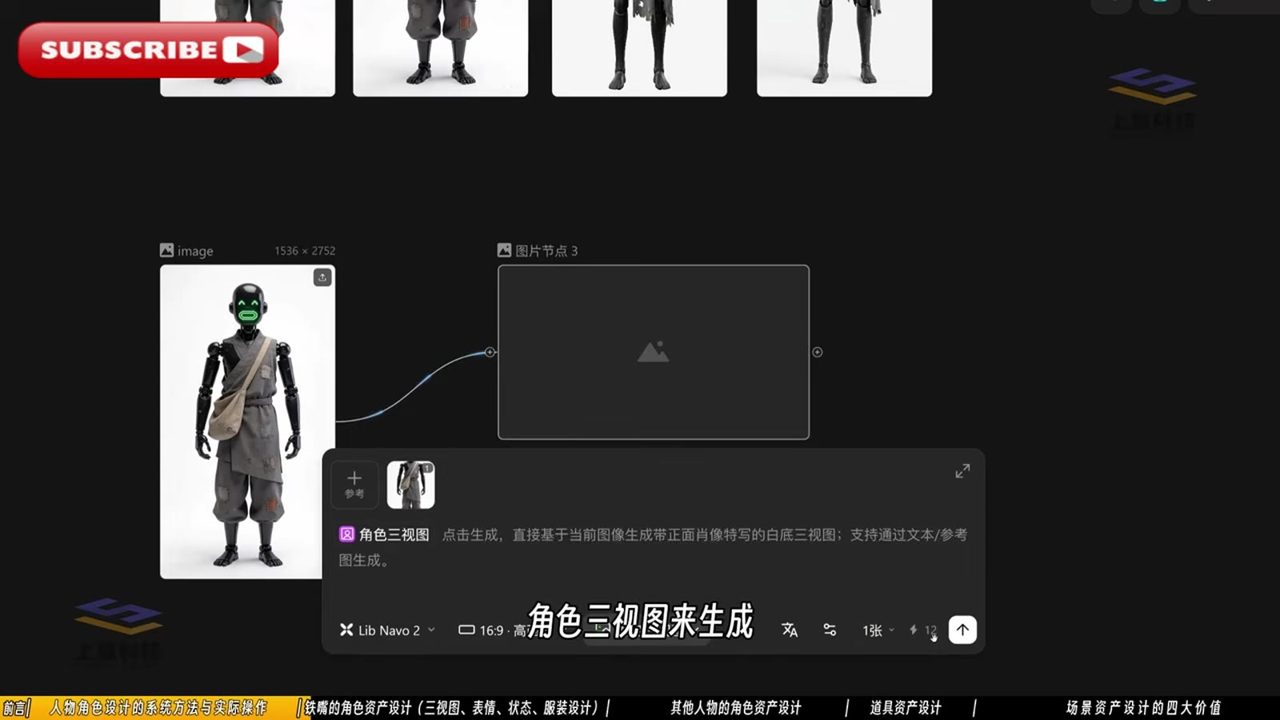
The character demoed in the tutorial is called “Iron Beak,” a robot wearing tattered cloth. Its assets include:
- Three-view sheet: LibTV has a dedicated “character three-view” node that generates a white-background three-view sheet with a frontal portrait close-up, based on a single character image
- Expression library: The frame shows expression cards labeled Happy, Curious, Wink, etc., each stored as an individual asset
- States and costumes: LED eye-color variations (sadness, red alert), outfit versions for different scenes
Real human characters go through the same process. The generation prompt for a Qing Dynasty eunuch character is transcribed below:
| |
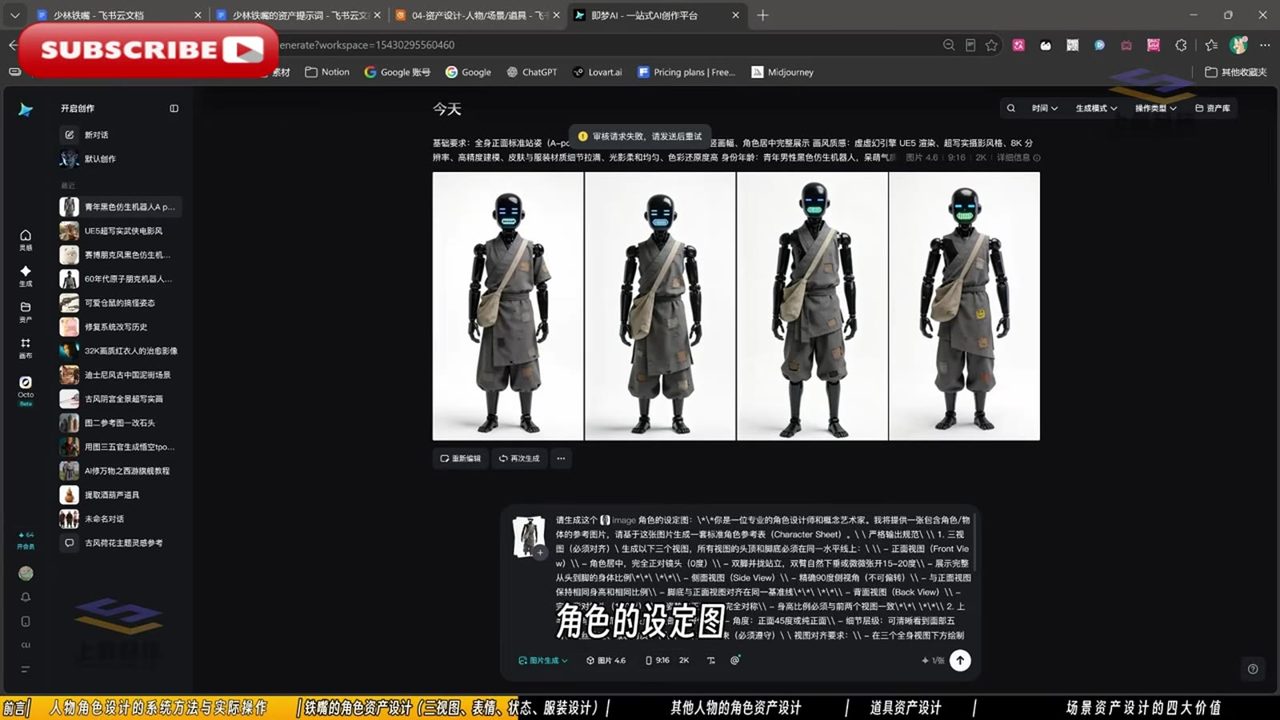
This prompt is worth reading closely. It doesn’t describe any specific shot—it defines asset specifications: standard pose (A-pose), clean background (white), even lighting (noon indoor natural light)—all chosen so downstream steps can easily pick and use them. Identity is anchored with a single line (“40-year-old eunuch, hunched”), and physical traits are written directly into the character design.
This is the first reason the eyes look natural: the same face across all shots comes from the same set of asset images. Character consistency is maintained by feeding the character asset images directly to the model as reference images during generation. The face is “pasted in”—no re-imagining needed on each generation pass.
Tier 2: Multi-image reference—taking directing control back from the model
The tutorial’s second half moves into LibTV’s canvas workflow, and this is where I think the pipeline reaches its highest technical sophistication.
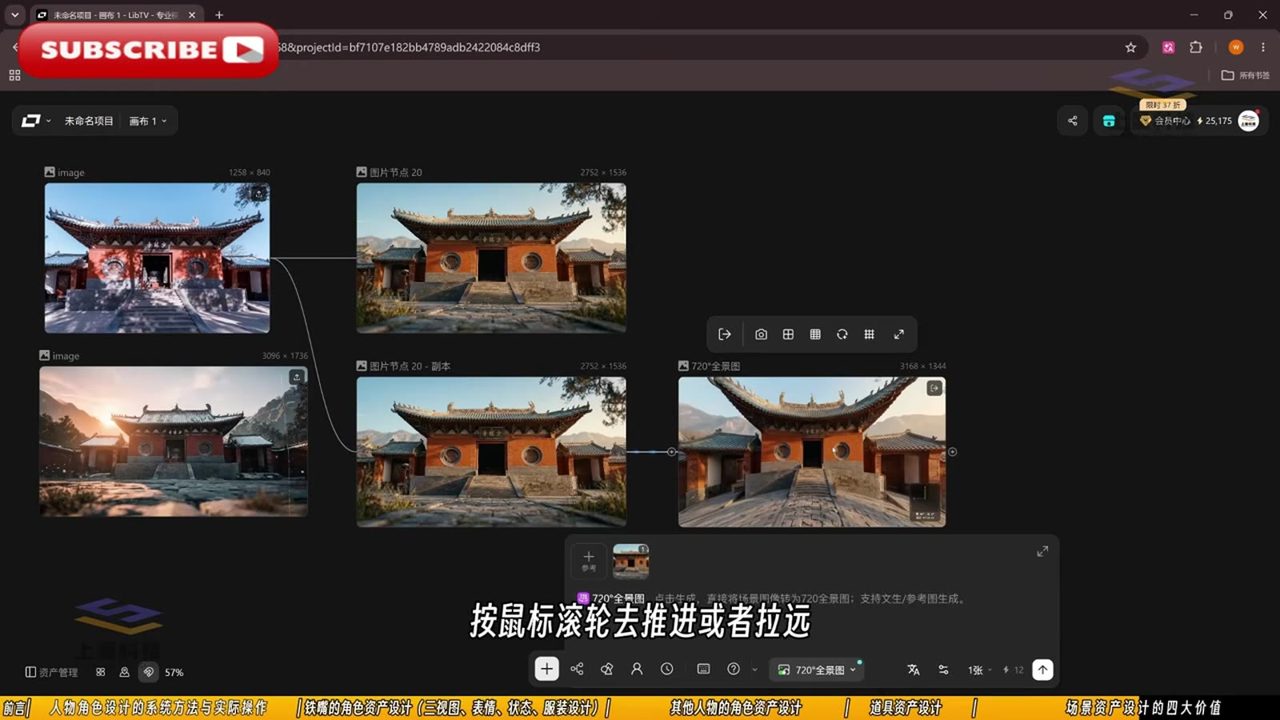
LibTV is a node-based workflow: image nodes, text nodes, and video nodes are wired together on a canvas, and assets flow from left to right. The video generation panel offers five modes: text-to-video, all-purpose reference, image-to-video, first-and-last-frame, and image reference.
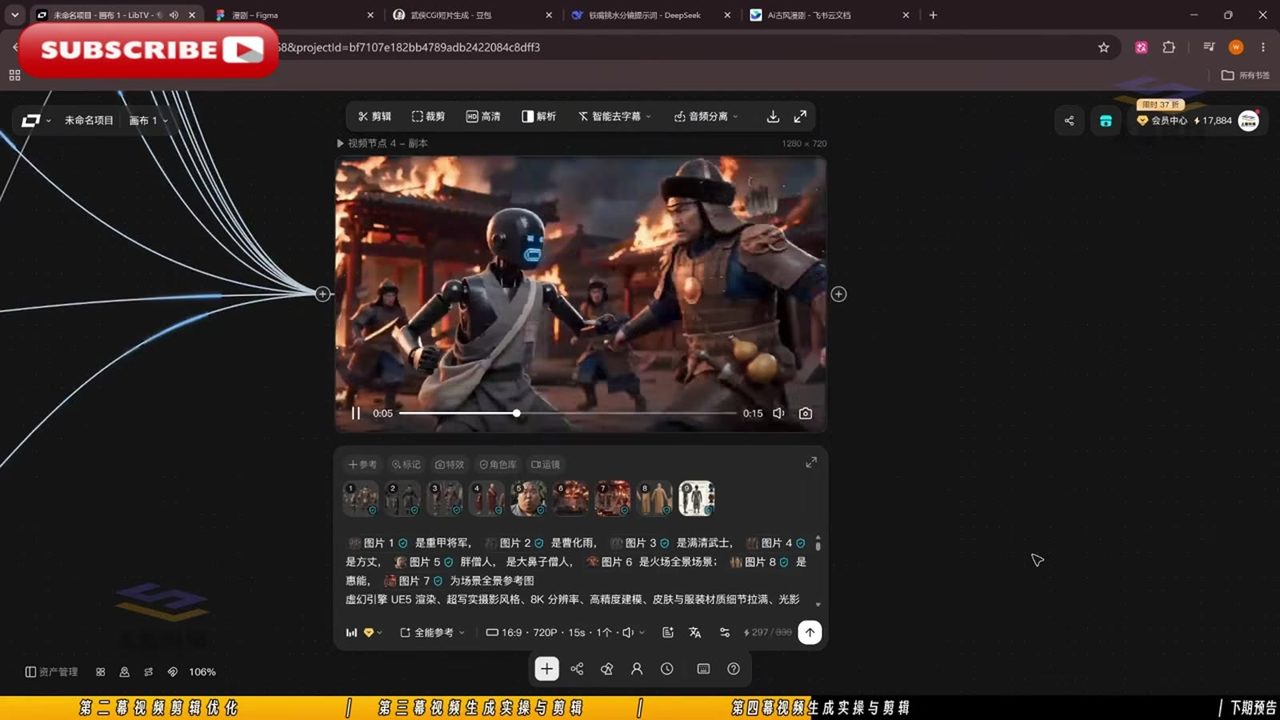
When generating a shot, the prompt looks like this:
| |
Count them: a single shot has 8 reference images attached. Characters are characters (Images 1–5, 8), scenes are scenes (Images 6–7), and within the prompt body, [Image N] acts as a pointer, explicitly directing each asset.
This corresponds to Seedance 2.5’s “all-purpose reference mode”—a single generation can mix up to 9 images, 3 video clips, and 3 audio clips. A 36Kr report noted that this capability made practitioners’ “card-pulling” (generation reroll) efficiency “at least ten times higher.”
The second reason the eyes look natural lives here: the subjects of the performance are fixed. When [Image 4 Abbot] and [Image 8 Huineng] make eye contact in the same shot, the model doesn’t have to conjure an interaction between two strangers. It’s generating gaze between two established faces. Pupil position, the landing point of the gaze, the muscle direction of micro-expressions—all have references to lean on. This is something pure text-to-video can never achieve.
The prompt structure for dialogue scenes makes the point even more clearly. The tutorial’s shot prompt template includes: style core, visual tone, scene, background characters, midground character blocking, character proportion relationships, foreground occlusion, and qualifiers. Blocking and proportion are called out as standalone items—meaning the creator is controlling at the prompt level “who’s closer to camera, whose face takes up how much frame, who’s half-occluded by whom.” The expressive close-ups are expressive because the creator planned the face-to-frame ratio from the start.
Tier 3: The model’s own acting chops
The first two tiers solve “is the face right.” The third tier solves “does it act convincingly.”
The shared advance of the 2025–2026 generation of video models is that “audio-visual co-emission” has become real: lip sync, sound effects, and emotional rhythm are output simultaneously during generation. Jimeng’s Seedance 2.5 has实测口碑 backed reputation for human realism—in third-party comparison tests, Jimeng-generated characters have “skin and hair with some natural imperfections, which actually makes them look more like real people.”
But the model’s weaknesses are equally clear. A 36Kr report quoted a practitioner: Jimeng’s “facial expressions aren’t refined enough—for instance, smiles come too abruptly or are missing altogether; you still need an actor to perform.” This pipeline’s countermeasure is hidden in the editing chapter:
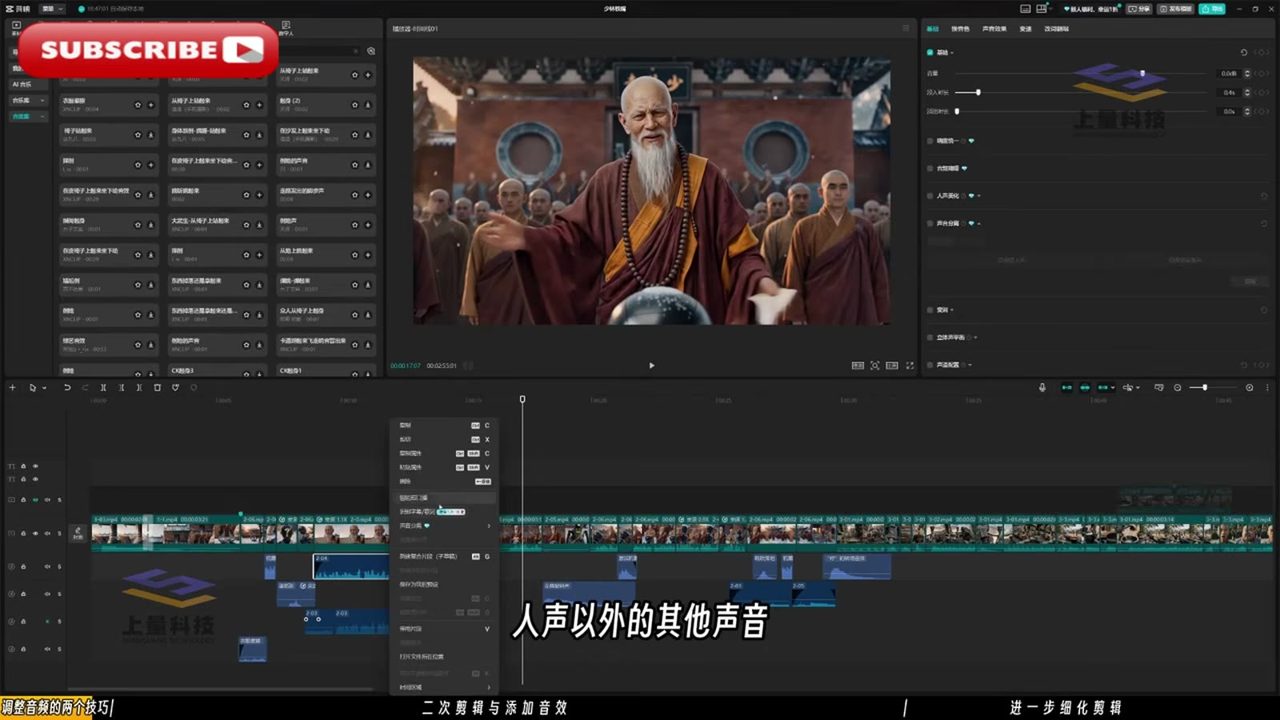
The tutorial’s final two chapters cover secondary editing in CapCut and adding sound effects. The left-side asset library shows a dense array of sound effect markers, with audio fade-in/fade-out manually adjusted segment by segment, plus cleanup tools like “smart subtitle removal.” AI shots are joined by editing rhythm; sound effects, music, and beat points are all hand-completed in post. Shots where the smile is too abrupt get cut and re-rolled; spots where the emotional buildup falls short are padded with music.
So the third reason: where the model’s acting falls short, rerolling plus editing picks up the slack. You don’t see the failures because the failed shots weren’t kept.
Back to the original question
Are the prompts detailed? Absolutely. Lighting alone is broken down across five dimensions—light source (natural/artificial), light quality (hard/soft), light direction (side/backlight/top), light and shadow (highlight/shadow sides), and light color (cool/warm/teal-orange contrast)—each taught as its own module. The RTCF framework standardizes the ordering of style, composition, shot distance, angle, height, lighting, and color tone.
But crediting the “naturalness” of Seoul’s a Bit Reckless Today to prompt detail is like crediting a delicious dish to the plating. The real structure is:
- Asset layer: character three-views + expression library + state library—faces and expressions have standard parts
- Reference layer: up to 9 images referenced per shot, characters and scenes mounted on separate tracks, gaze interaction has a basis to lean on
- Generation layer: the model’s native support for lip sync and emotional rhythm, plus manual rerolling when smiles are too abrupt
- Post layer: editing rhythm, sound effects, and music stitch 5–15-second fragments into continuous narrative
Prompts are the human-machine interface of this system, not the engine.
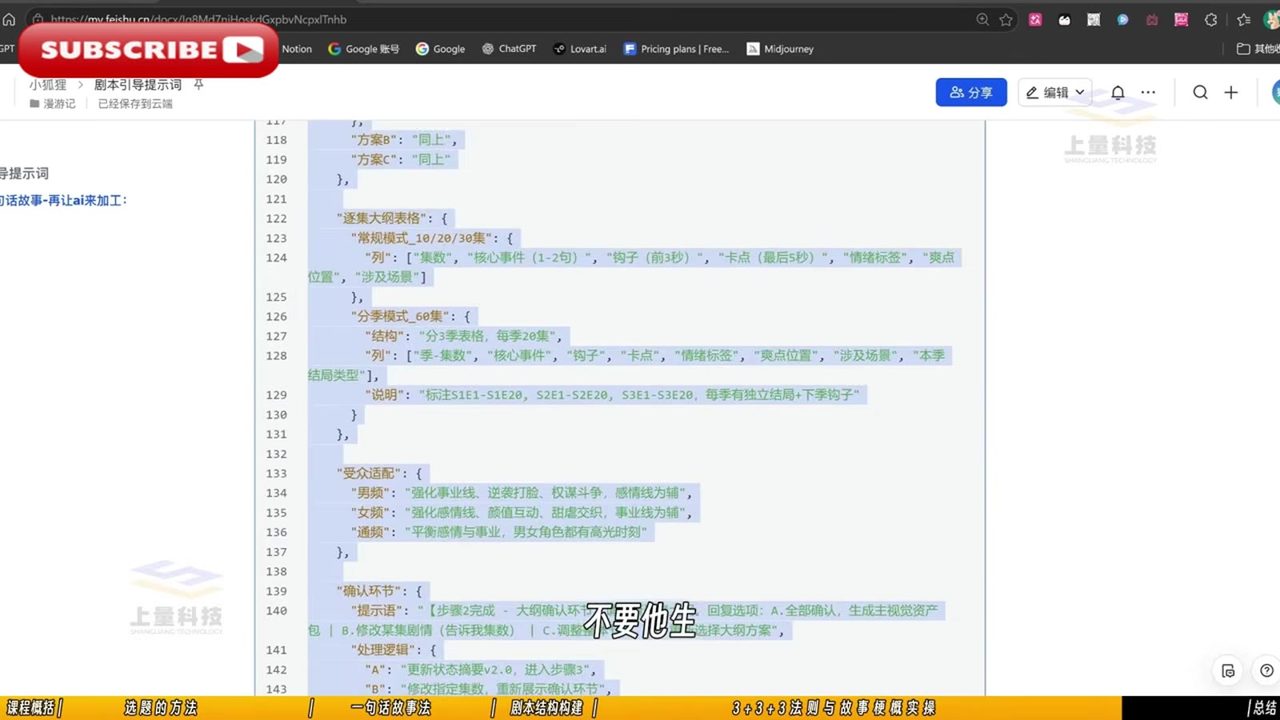
As an aside, the tutorial’s screenwriting methodology is surprisingly “traditional”: the 3+3+3 rule (3 hook designs + 3 emotional turns + 3 contrast/conflict points), and the episode outline spreadsheet includes columns for hook (first 3 seconds) and cliffhanger (last 5 seconds)—structurally identical to the viral formula for live-action short dramas. AI replaced the camera and the actors; it didn’t replace the rules of storytelling.
The cost-side shift is even more dramatic. Traditional live-action short dramas run ¥50,000–100,000 per episode; this pipeline compresses it to under ¥5,000 per episode. ByteDance’s drama platform daily token consumption had broken through ¥70 million by 2026, surpassing live-action short dramas. Behind the natural-eyed AI actors lies a business whose cost structure has been fundamentally rebuilt.
If you want to try it yourself: tool list and real costs
The tutorial walks through the workflow, but copying its tool combination exactly may not be cost-effective. Below is the ledger I calculated after actual verification, with all prices sourced from official platform pages in September 2026.
First, understand what LibTV is and how much it costs
LibTV is a node-based AI video workflow platform from LiblibAI (哩布哩布), with a core selling point of “canvas + nodes”: it integrates multiple models (Seedance 2.5, Wan 3.0, Minimax H3 Max, Kling 3.0, Happy Horse 1.1) plus asset libraries, scripts, smart storyboarding, and editing onto a single canvas, so you don’t have to bounce between five websites exporting assets back and forth. Those “one-click character three-view generation,” “720° panoramic image,” and “multi-subject reference” features in the tutorial are all LibTV node functions.
Its subscription prices (September 2026 Double Festival promo, Creator Member tier):
| Tier | Price | Effective monthly | Credits/mo | Cost per credit | Notes |
|---|---|---|---|---|---|
| Standard | ¥729/yr (¥599 renew) | ¥47 | 1,500 | ¥0.032 | 8 concurrent, 60GB storage |
| Plus | ¥2,199/yr (¥1,799 renew) | ¥100 | 4,600 | ¥0.022 | 12 concurrent, 100GB |
| Pro | ~¥4,999/yr tier | ~¥190 | 11,700 | ~¥0.019 | 20 concurrent, 300GB |
| Premium | ¥14,999/yr (¥7,399 renew) | ¥583 | 32,800 | ¥0.018 | Unlimited concurrent, 600GB |
| Ultimate | ¥22,999/yr (¥10,999 renew) | ¥858 | 50,500 | ¥0.017 | Unlimited concurrent, 1000GB |
The key to reading this table: the per-credit unit price decreases as tier rises, but absolute spending increases monotonically. The Standard tier’s 1,500 monthly credits, based on Seedance 2.5 720P credit consumption (official table: Standard tier generates approximately 33 seconds of that model’s video per month), works out to roughly 45 credits/second—this is the entry-level threshold for heavy video generation.
A free tier does genuinely exist: daily login grants 20 credits, 2 daily half-price video generations, 3GB cloud storage, and new registrants get 100 bonus credits. But 20 credits can’t even generate a single 5-second 720P video (approximately 225 credits needed per the table above)—free is only enough to poke around the interface.
Alternatives: choose based on your goal
Goal 1: Just want to replicate something like Seoul’s a Bit Reckless Today—no LibTV subscription needed.
LibTV’s value lies in “workflow integration”; the underlying models can all be used directly from their original platforms:
- Jimeng (jimeng.jianying.com): ByteDance’s official platform, the native entry point for Seedance 2.5. Membership starts at ¥69/month or ¥659/year; free users get 60–100 credits daily. Note the April price hike: Basic/Standard/Pro annual fees rose to ¥659/¥1,899/¥5,199, first-year discount adjusted from 50% to 60%, monthly credits shrank from 1,080/4,000/15,000 to 725/2,210/6,160, with practitioners estimating “a single 15-second video costs several times more.” But for light personal use, ¥69/month remains the cheapest official option.
- Kling (klingai.com): Kuaishou’s official platform. API pricing is transparent: Kling 3.0 720P silent is ¥0.6/sec, with audio ¥0.9/sec, 1080P ¥0.8–1.2/sec; Kling Image 3.0 is ¥0.2/photo. Creator suite subscription is billed separately. Its shot-level narrative feel and cinematic image quality have been validated in works like Paper Phone and Peaceful Years, but character consistency relies on a “subject library” rather than multi-image reference, giving less workflow flexibility than LibTV.
- Wan 2.5/3.0 (Alibaba Tongyi): Alibaba’s Happy Horse 1.0/1.1 goes the API route, with a limited-time 40% discount on LibTV. Quality-wise, it’s more stable for action scenes and physical simulation, but the “storyboard-thinking” approach for Chinese prompts isn’t as strong as Seedance’s.
Goal 2: Want Jimeng’s model but want to sidestep the subscription trap—go API.
Volcano Engine official API (token-based billing, only charges for successfully generated videos):
| Model | 720P 5s, no reference | Effective unit price |
|---|---|---|
| doubao-seedance-2.5 | ¥7.56/clip | ¥1.51/sec |
| doubao-seedance-2.0 | — | ~¥0.9/sec |
| seedance-2.0-mini (enterprise limited-time 40% off) | — | from ¥0.2/sec |
Third-party channels (e.g., Atlas Cloud) offer Seedance 2.0 Fast Edition as low as $0.022/sec (~¥0.16/sec), but practitioner feedback notes “API stability is inconsistent, generation quality fluctuates.” For personal short drama creation, prioritize official channels; third-party is suited for high-volume batch runs.
My recommended setup (individual creator, monthly budget ¥100–300)
- Script & storyboard: Doubao/DeepSeek, free—write the 3+3+3 structured episode outline + storyboard table (same method as the tutorial, managed in Feishu docs)
- Character assets: Jimeng ¥69/month membership, generate three-views + expression library (directly copy the tutorial’s “A-pose white background + UE5 rendering” prompt)
- Video generation: For short drama mode, prioritize Jimeng Seedance 2.5 (all-purpose reference, 9-image reference); when budget is tight, Seedance 2.0 mini (API ¥0.2/sec, a 720P 15-second shot costs ~¥3)
- Editing: CapCut free version (same as the tutorial), use its built-in asset library for sound effects
- LibTV subscription: Only consider the Plus tier (¥100/month) if you’re producing 5+ episodes per month; below that volume, the Jimeng + CapCut combo saves ¥2,000+/year
A 20-episode × 1-minute vertical short drama, if generated entirely on Seedance 2.5 API 720P (~20 minutes of source material), has a pure compute cost of approximately ¥1,800 (at ¥1.51/sec); swapping to the mini model with a 3x reroll rate comes to about ¥700. That’s the composition of “under ¥5,000 per episode”: ¥35–90/episode in compute, with the remainder being human time.
Appendix: Tutorial source and verification method
The tutorial in question is the YouTube channel’s Jimeng Seedance 2.5 + LibTV for Making AI Live-Action Short Dramas end-to-end practical course, published in early August 2026, total runtime 3 hours 12 minutes, comprising 10 chapters. All interface screenshots and prompt transcriptions in this article were obtained through frame-by-frame analysis of the video (1/10-second frame extraction + HD keyframe zoom-in and recognition). Tool and workflow descriptions are based on the video’s actual operation footage. Model capability data references 36Kr’s “Can Jimeng and Kling Catch the AI Short Drama Wave?”, East Money/Blue Whale Finance reports on Jimeng’s price hike, the Volcano Engine official pricing page, and the LibTV official subscription page.
Note: Character names such as “Iron Beak,” “Martial Fool No. 7,” and the prompt fragments shown above are all instructional demo content, not assets from the actual Seoul’s a Bit Reckless Today production; the finished sample screenshots are used for style assessment only. To watch the original series, please visit Douyin.