
Snowflake is reframing FinOps for the AI era by combining AI-assisted cost analysis with new governance primitives for AI workloads.
AI Changes the Nature of Cost Management
Cloud cost spikes used to be easier to trace: a warehouse ran longer, compute credits increased, or storage grew. AI spending is harder to explain. A Snowflake Cortex Agent can reason across multiple datasets, a single prompt can trigger substantial token usage, and many AI workloads are intentionally exploratory.
That is why AI has moved into the center of FinOps. The FinOps Foundation’s State of FinOps 2026 Report says 98% of FinOps teams are now managing AI spend, compared with 31% two years earlier. The main pain points are limited visibility, difficulty allocating costs to business units, and uncertainty around ROI for experimental work.
CoCo Turns Cost Analysis Into a Conversation
Snowflake’s first response is to embed AI into cost management itself. Snowflake CoCo, its AI-powered coding agent, now includes a Cost Intelligence skill. Instead of writing SQL against ACCOUNT_USAGE, users can ask questions such as why compute cost spiked on Wednesday, which users consumed the most warehouse credits, or what the six-month trend looks like for the top five warehouses.
CoCo connects warehouse activity, query patterns, user behavior, and cost attribution, while preserving context for follow-up questions. The capability is available through Snowsight UI as well as Snowflake CoCo CLI and Desktop, serving both FinOps analysts and platform engineers.
Snowflake is also applying CoCo to anomaly investigation. Cost Anomaly can already detect unusual spending, but teams often still need to explain the cause. With CoCo embedded in the cost interface, users can select an anomaly on a chart and ask for an explanation. CoCo then correlates the event with warehouse activity, users, and workloads, returning a readable narrative in many cases within seconds.
From Dashboard to Cost Command Center

The updated Snowsight Cost Management Account Overview, announced as generally available at Snowflake Summit 2026, is positioned as more than a reporting dashboard. It brings together budget health, open anomalies, warehouse attribution status, and credit consumption by service type.
The important shift is actionability. If an anomaly needs investigation, CoCo is one click away. If a warehouse lacks cost-center ownership, CoCo can help generate a tagging plan. Tags are metadata used to map resources to teams, projects, or cost centers, which makes allocation and budget enforcement possible.
Governing AI Spend Directly
Snowflake’s second response is to govern AI as its own cost category. In the ORGANIZATION_USAGE schema, Snowflake has introduced seven organization-level AI Services views for major AI capabilities, including Cortex AI Functions, Cortex Agents, Snowflake CoWork, and Snowflake CoCo. These views show daily AI credit consumption by account, user, and function or model, giving finance, platform engineering, and FinOps teams a unified source for trend analysis and internal chargeback.
Inside Snowsight, administrators can also filter consumption by AI service type under Admin > Cost Management, separating AI usage from traditional warehouse compute.
Budgets have been extended to cover AI Functions, Snowflake CoWork, Cortex Agents, and Snowflake CoCo. Tag-based budgets let organizations map spending limits to teams, cost centers, or projects. Notifications can be sent through email, Slack, Teams, PagerDuty webhooks, or cloud provider message queues. When thresholds are crossed, Custom Actions can trigger stored procedures such as revoking access, writing audit logs, or starting downstream workflows.
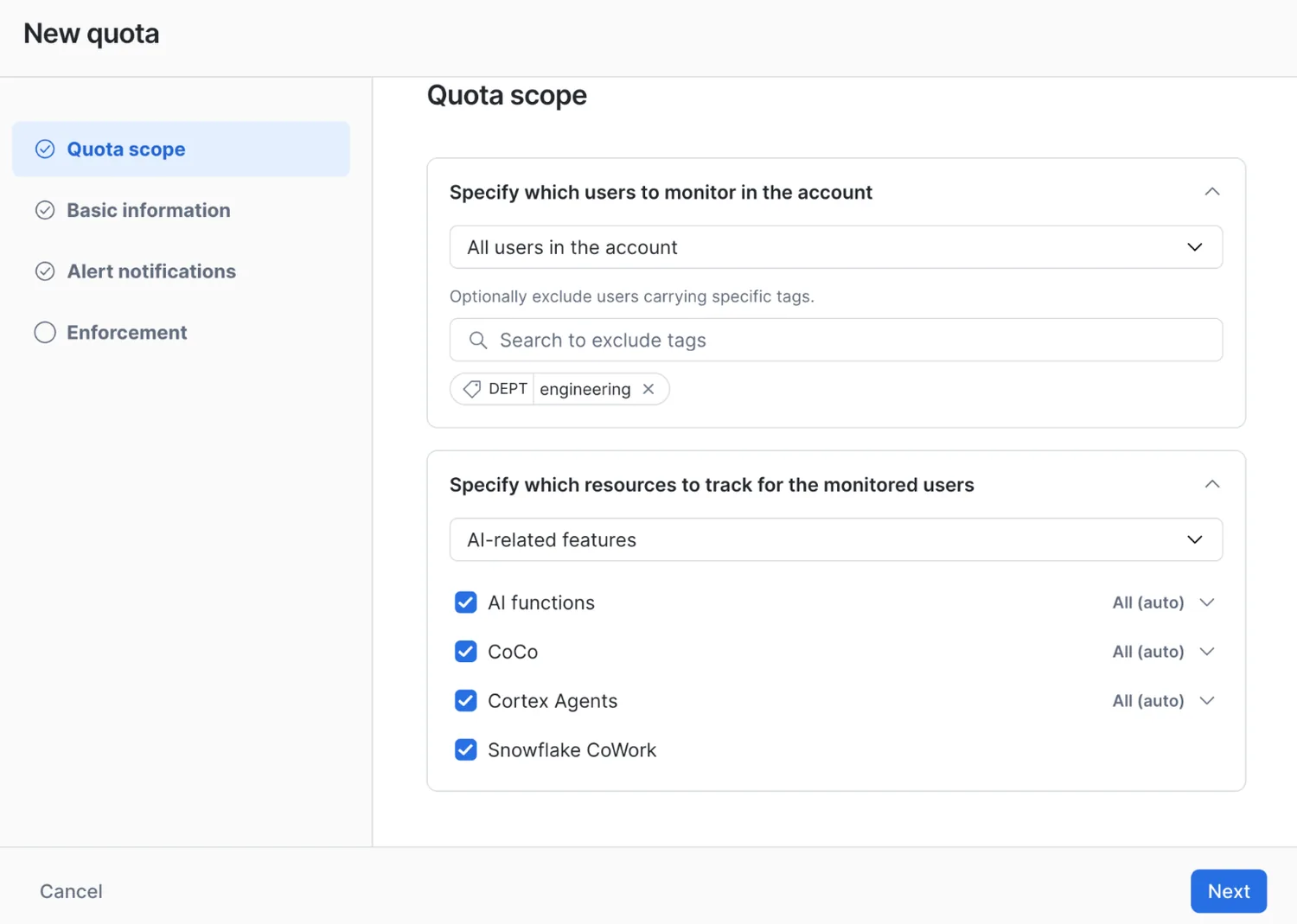
Snowflake is also introducing Per-user quotas in public preview. These set daily or monthly credit ceilings independently for each user and cover AI functions, Snowflake CoWork, Cortex Agents, and Snowflake CoCo. User scope is defined through tags. Both administrators and users receive notifications as limits approach or are reached. In stricter environments, access to specific AI functions can be capped within minutes after a user hits the quota, then restored in the next cycle.
What This Signals for AI FinOps
Snowflake’s approach reflects a broader market direction: AI is both a FinOps assistant and a new governed workload. Natural-language analysis lowers the barrier to understanding spend, while anomaly explanations reduce the time between detection and diagnosis. At the same time, granular usage views, tag-based budgets, and per-user quotas give organizations controls that match the speed of AI adoption.
As AI capabilities spread beyond specialist teams, monthly reports and manual approvals will not be enough. The next phase of AI FinOps is likely to combine visibility, automated alerts, and programmable guardrails. The goal is not to block experimentation, but to make self-service AI financially observable and controllable from the start.